Ruby
 Golang
 .Net
 MCP
 C++




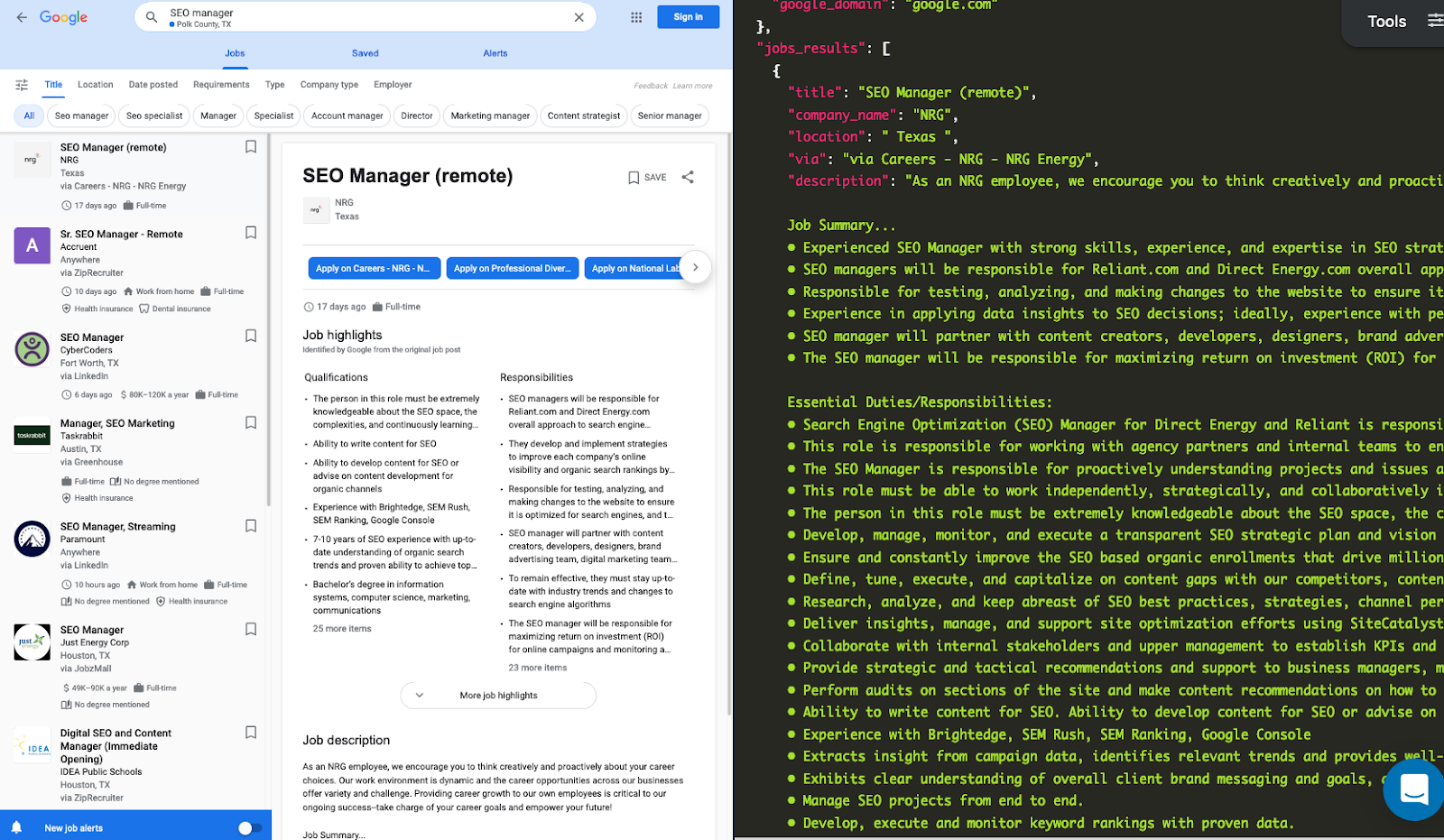
There are thousands of job boards on the internet. It is time-consuming to search for a job on each job board. Google Jobs is a job search engine that aggregates job listings from various sources, including job boards, company career pages, and staffing agencies.

Scraping Google Jobs Results helps you find comprehensive job listings, customized searches - focus on specific job titles, locations, companies, or job types to find the most relevant positions.
Furthermore, you can receive real-time updates on new job listings that match your criteria, analyze job market trends, salary ranges, and demand for specific skills by scraping and processing job data.
Why use an API?
- No need to create a parser from scratch and maintain it.
- Bypass blocks from Google: solve CAPTCHA or solve IP blocks.
- Pay for proxies and CAPTCHA solvers.
- Don't need to use browser automation.
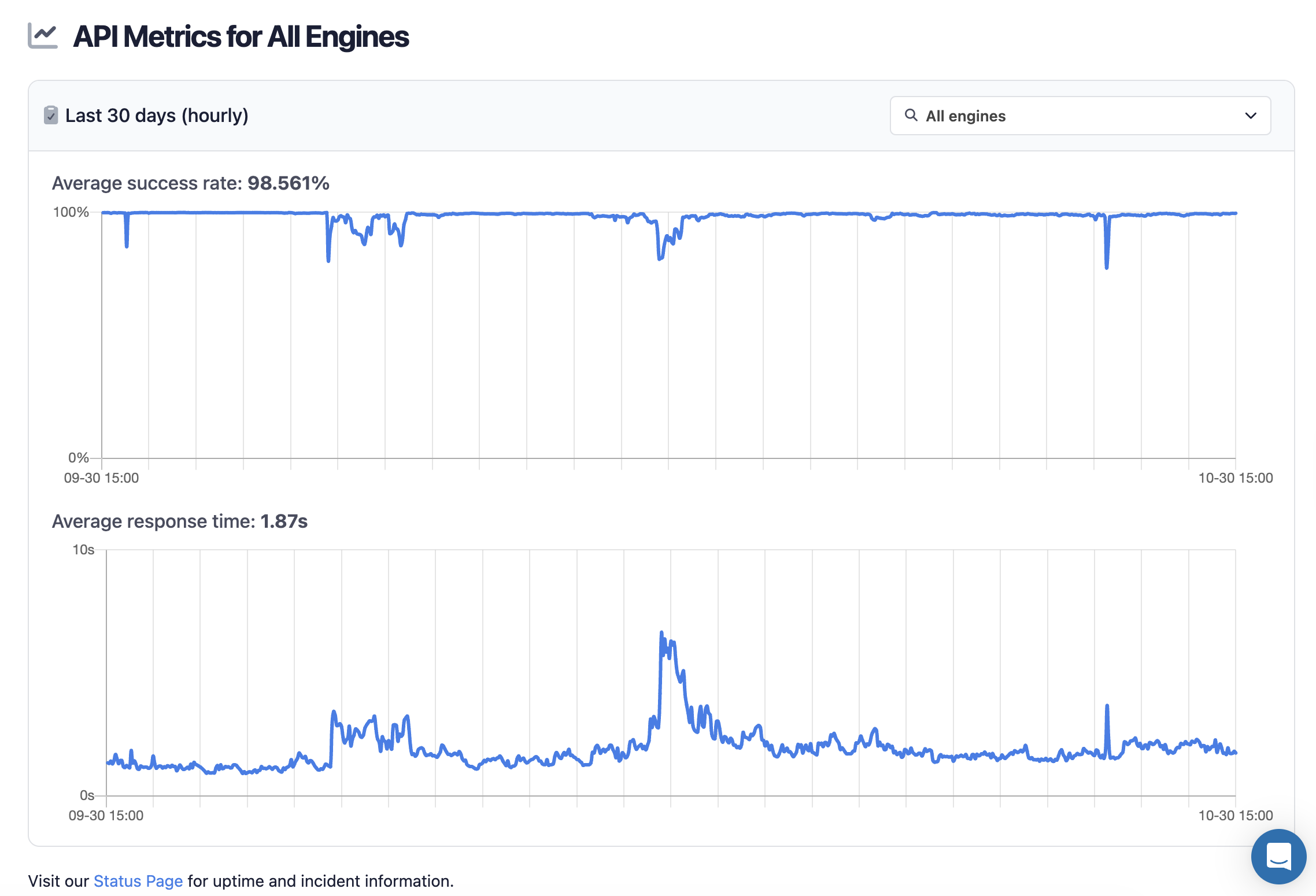
SerpApi handles everything on the backend, with fast response times under ~2 seconds per request and without browser automation, which is much faster. Response times and status rates are shown under SerpApi Status page.
Setting up a SerpApi account
SerpApi offers a free plan for newly created accounts. Head to the sign-up page to register an account and complete your first search with our interactive playground. When you want to do more searches with us, please visit the pricing page.
Once you are familiar with all results, you can use SERP APIs with your API Key. Keep the key out of your code by saving it as an environment variable:
export SERPAPI_API_KEY="your_api_key"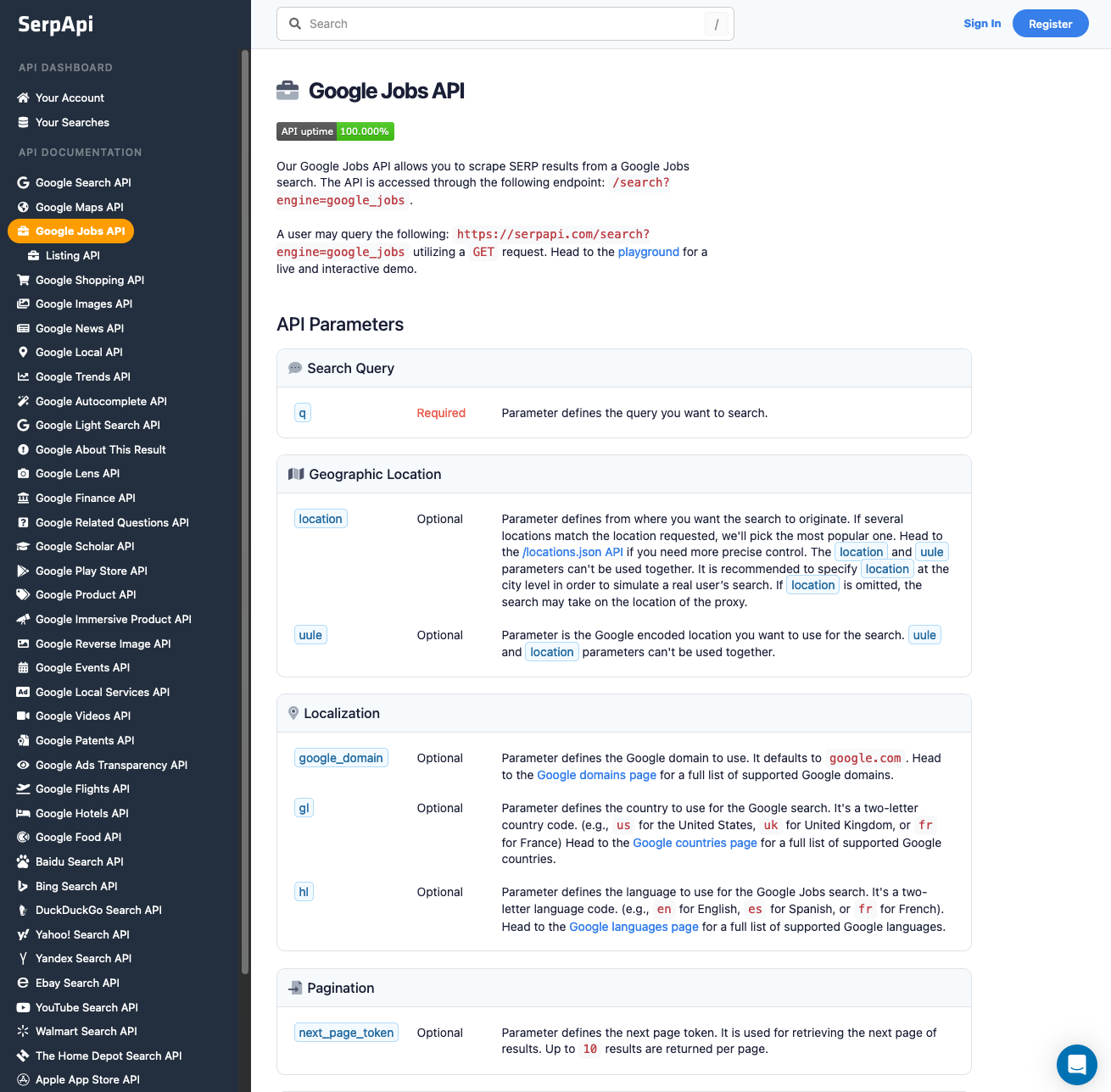
What data can you scrape from Google Jobs
Each job in jobs_results can include these fields:
| Field | What it contains |
|---|---|
title |
Job title |
company_name |
Hiring company |
location |
City or "Anywhere" for remote jobs |
via |
The board Google found the job on, such as LinkedIn or ZipRecruiter |
extensions |
Short tags such as posted date, salary, job type, and benefits |
detected_extensions |
Some of the same tags as named keys. Not every job has it. |
description |
Job description text |
job_highlights |
Qualifications, benefits, and responsibilities as lists |
apply_options |
Every place you can apply, with a title and link |
share_link |
Link to the job on Google |
thumbnail |
Company logo |
job_id |
ID for this job in this search |
Scrape your first Google Jobs results with SerpApi
Head to the Google Jobs Results from the documentation on SerpApi for details.
In this tutorial, we will scrape job results when searching with "SEO manager" keyword. The data contains: "title", "company_name", "location", "description", "apply_options", and more.
You can call the API with a simple GET request, Python, JavaScript, cURL, or any other language. The results are the same for every method, so pick the one that fits your project.
GET request
Paste this URL into your browser, replacing YOUR_API_KEY with your key:
https://serpapi.com/search.json?engine=google_jobs&q=SEO+manager&location=Austin%2C+Texas%2C+United+States&gl=us&hl=en&api_key=YOUR_API_KEYPython tutorial
First, install the official SerpApi Python library.
pip install serpapiSet up the SerpApi credentials and search.
import os
import serpapi

client = serpapi.Client(api_key=os.getenv("SERPAPI_API_KEY"))

params = {
    "engine": "google_jobs",                        # SerpApi search engine
    "q": "SEO manager",                             # search query
    "location": "Austin, Texas, United States",     # where the search comes from
    "gl": "us",
    "hl": "en",
}

results = client.search(params)
jobs = results.get("jobs_results", [])

for job in jobs:
    print(job.get("title"), "|", job.get("company_name"), "|", job.get("location"))
The parameters gl and hl represent the country and language to use for the Google Jobs search. And this q is the search query you want to search. The location parameter sets the city the search comes from. Use a city-level location for results closest to what a real user sees.
You can store Jobs Results JSON data in databases or export it to a CSV file.
import csv


def save_to_csv(jobs, filename="google_jobs.csv"):
    header = ["title", "company_name", "location", "via", "extensions",
              "apply_link", "description", "thumbnail", "job_id"]

    with open(filename, "w", encoding="utf-8", newline="") as f:
        writer = csv.writer(f)
        writer.writerow(header)

        for job in jobs:
            apply_options = job.get("apply_options") or [{}]
            writer.writerow([
                job.get("title"),
                job.get("company_name"),
                job.get("location"),
                job.get("via"),
                ", ".join(job.get("extensions", [])),
                apply_options[0].get("link"),
                job.get("description"),
                job.get("thumbnail"),
                job.get("job_id"),
            ])

    print(f"Saved {len(jobs)} jobs to {filename}")


save_to_csv(jobs)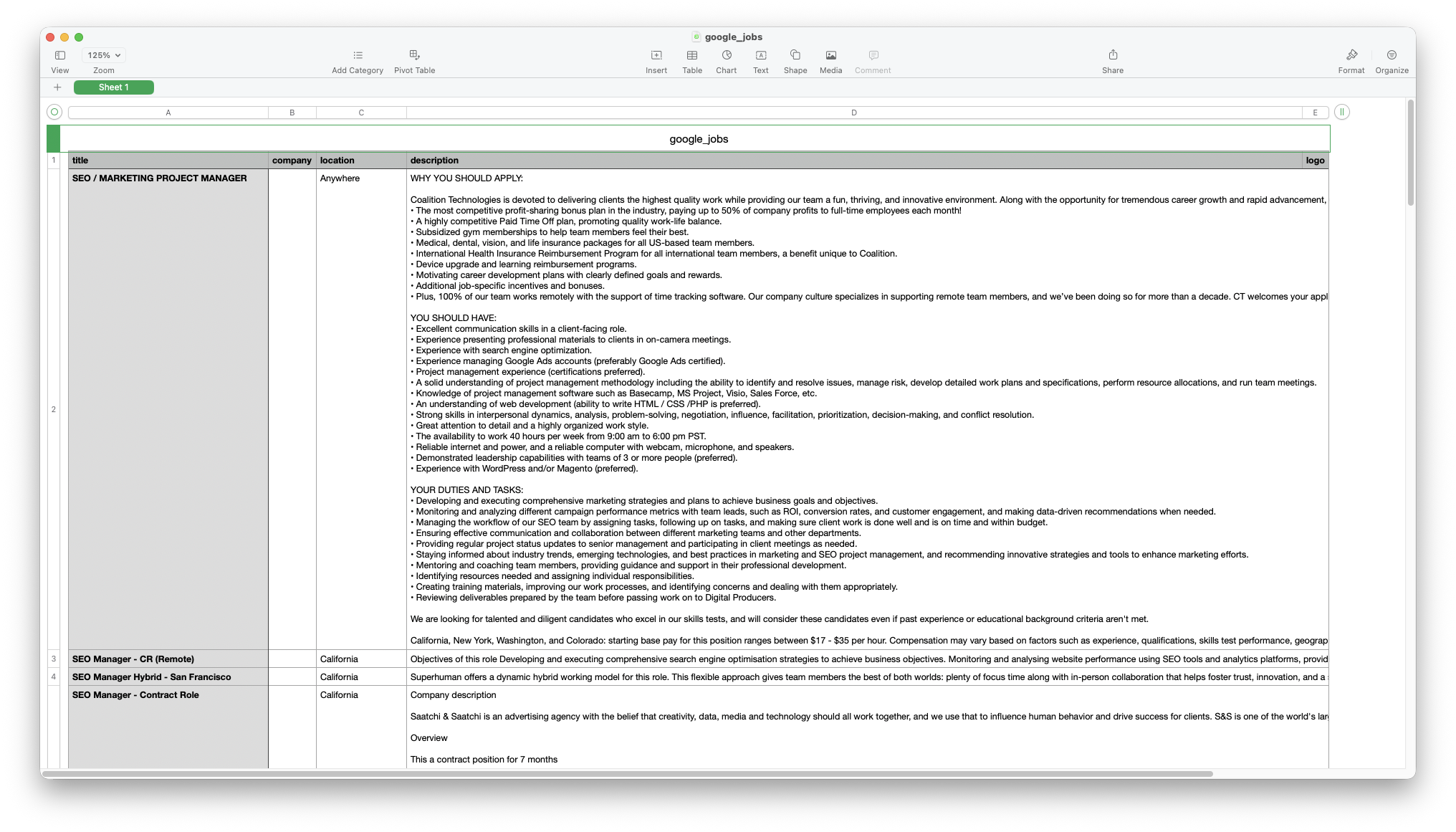
Each request returns up to 10 jobs. To get more, read next_page_token from serpapi_pagination and send it with the next request. The max_pages cap stops the loop so you don't use more searches than you planned.
import json


def fetch_jobs(search_params, max_pages=3):
    page_params = dict(search_params)
    all_jobs = []

    for page in range(max_pages):
        results = client.search(page_params)
        page_jobs = results.get("jobs_results", [])
        if not page_jobs:
            break

        all_jobs.extend(page_jobs)
        print(f"Page {page + 1}: {len(page_jobs)} jobs")

        next_token = results.get("serpapi_pagination", {}).get("next_page_token")
        if not next_token:
            break
        page_params["next_page_token"] = next_token

    return all_jobs


all_jobs = fetch_jobs(params, max_pages=3)

with open("google_jobs.json", "w", encoding="utf-8") as f:
    json.dump(all_jobs, f, indent=2, ensure_ascii=False)

save_to_csv(all_jobs)
Google removed the old start offset parameter, so next_page_token is the only way to page through Google Jobs.
JavaScript Tutorial (Node.js)
First, we need to install the official serpapi package:
npm init -y
npm install serpapi
npm pkg set type=module
The last command sets "type": "module" in package.json, so Node.js lets you use import and top-level await in a .js file.
Then, create index.js, import getJson from the serpapi library, and write a search query and the necessary parameters for making a request.
import { getJson } from "serpapi";
import { writeFileSync } from "node:fs";

const params = {
  engine: "google_jobs", // search engine
  q: "SEO manager", // search query
  location: "Austin, Texas, United States", // where the search comes from
  gl: "us", // country
  hl: "en", // language
  api_key: process.env.SERPAPI_API_KEY,
};uule parameter instead of location to pass an encoded location. Make it with SerpApi's UULE Generator. location and uule can't be used together.Next, we loop through pages of job results using Google's pagination method next_page_token.
const maxPages = 3; // stop after this many pages
const allJobs = []; // array to store all scraped jobs
Why an array?
We will collect results from multiple pages until no further results are available or we reach maxPages.
Next, we need to use while loop to fetch all pages. Inside the loop:
- We call the API
- Add the job results
- Look for
next_page_token - Stop the loop when there is no next page
for (let page = 0; page < maxPages; page++) {
  const json = await getJson(params);
  const jobs = json.jobs_results ?? [];
  if (jobs.length === 0) break;

  allJobs.push(...jobs);
  console.log(`Page ${page + 1}: ${jobs.length} jobs`);

  const nextToken = json.serpapi_pagination?.next_page_token;
  if (!nextToken) break;
  params.next_page_token = nextToken;
}

writeFileSync("google_jobs.json", JSON.stringify(allJobs, null, 2));
console.log(`Saved ${allJobs.length} jobs to google_jobs.json`);
Run it with:
node index.jsThe example of the first result output in JSON format:
[
  {
    "title": "SEO / MARKETING PROJECT MANAGER",
    "company_name": "Coalition Technologies",
    "location": "Anywhere",
    "via": "Indeed",
    "share_link": "https://www.google.com/search?ibp=htl;jobs&q=SEO+manager&htidocid=MGL1DlRMDYIJ9S1TAAAAAA%3D%3D&hl=en-US&shndl=37&shmd=H4sIAAAAAAAA_xWMsQrCMBQAce0nOL3BSbARQQedSgnFiq3U7iUJzyQS80pfhv6LP2tdbriDy76r7PSULQi4F91N9temgkfX1rLsF9MUlexgBzVpYFSTcUARKiIbcH1xKY18FoI55JaTSt7khj6CImqaxZs0_zGwUxOOQSUcDsf9nI_RbjclqeCTX3Y9GhcpkPXI4COUS3jRFL36AY0OyBueAAAA&shmds=v1_AdeF8KjbnyFz4FzqsHm60hu6qka1jqoLYTCYhPYelMLNNggF9A&shem=bdslc,damc&source=sh/x/job/li/m1/1#fpstate=tldetail&htivrt=jobs&htiq=SEO+manager&htidocid=MGL1DlRMDYIJ9S1TAAAAAA%3D%3D",
    "thumbnail": "https://serpapi.com/searches/6938c00da3ce841d0a59c1a2/images/449d886478e4414c3cef1330654d493a57f630269a9ef9d9924b5c21c43399a2.jpeg",
    "extensions": [
      "6 days ago",
      "17–35 an hour",
      "Work from home",
      "Full-time",
      "No degree mentioned",
      "Dental insurance",
      "Health insurance",
      "Paid time off"
    ],
    "detected_extensions": {
      "posted_at": "6 days ago",
      "salary": "17–35 an hour",
      "work_from_home": true,
      "schedule_type": "Full-time",
      "qualifications": "No degree mentioned",
      "dental_coverage": true,
      "health_insurance": true,
      "paid_time_off": true
    },
    "description": "WHY YOU SHOULD APPLY:\n\nCoalition Technologies is devoted to delivering clients the highest quality work while providing our team a fun, thriving, and innovative environment. Along with the opportunity for tremendous career growth and rapid advancement, CT offers:\n• The most competitive profit-sharing bonus plan in the industry, paying up to 50% of company profits to full-time employees each month!\n• A highly competitive Paid Time Off plan, promoting quality work-life balance.\n• Subsidized gym memberships to help team members feel their best.\n• Medical, dental, vision, and life insurance packages for all US-based team members.\n• International Health Insurance Reimbursement Program for all international team members, a benefit unique to Coalition.\n• Device upgrade and learning reimbursement programs.\n• Motivating career development plans with clearly defined goals and rewards.\n• Additional job-specific incentives and bonuses.\n• Plus, 100% of our team works remotely with the support of time tracking software. Our company culture specializes in supporting remote team members, and we’ve been doing so for more than a decade. CT welcomes your application, wherever in the world it's coming from!\n\nYOU SHOULD HAVE:\n• Excellent communication skills in a client-facing role.\n• Experience presenting professional materials to clients in on-camera meetings.\n• Experience with search engine optimization.\n• Experience managing Google Ads accounts (preferably Google Ads certified).\n• Project management experience (certifications preferred).\n• A solid understanding of project management methodology including the ability to identify and resolve issues, manage risk, develop detailed work plans and specifications, perform resource allocations, and run team meetings.\n• Knowledge of project management software such as Basecamp, MS Project, Visio, Sales Force, etc.\n• An understanding of web development (ability to write HTML / CSS /PHP is preferred).\n• Strong skills in interpersonal dynamics, analysis, problem-solving, negotiation, influence, facilitation, prioritization, decision-making, and conflict resolution.\n• Great attention to detail and a highly organized work style.\n• The availability to work 40 hours per week from 9:00 am to 6:00 pm PST.\n• Reliable internet and power, and a reliable computer with webcam, microphone, and speakers.\n• Demonstrated leadership capabilities with teams of 3 or more people (preferred).\n• Experience with WordPress and/or Magento (preferred).\n\nYOUR DUTIES AND TASKS:\n• Developing and executing comprehensive marketing strategies and plans to achieve business goals and objectives.\n• Monitoring and analyzing different campaign performance metrics with team leads, such as ROI, conversion rates, and customer engagement, and making data-driven recommendations when needed.\n• Managing the workflow of our SEO team by assigning tasks, following up on tasks, and making sure client work is done well and is on time and within budget.\n• Ensuring effective communication and collaboration between different marketing teams and other departments.\n• Providing regular project status updates to senior management and participating in client meetings as needed.\n• Staying informed about industry trends, emerging technologies, and best practices in marketing and SEO project management, and recommending innovative strategies and tools to enhance marketing efforts.\n• Mentoring and coaching team members, providing guidance and support in their professional development.\n• Identifying resources needed and assigning individual responsibilities.\n• Creating training materials, improving our work processes, and identifying concerns and dealing with them appropriately.\n• Reviewing deliverables prepared by the team before passing work on to Digital Producers.\n\nWe are looking for talented and diligent candidates who excel in our skills tests, and will consider these candidates even if past experience or educational background criteria aren't met.\n\nCalifornia, New York, Washington, and Colorado: starting base pay for this position ranges between $17 - $35 per hour. Compensation may vary based on factors such as experience, qualifications, skills test performance, geographic location, and seniority of the position offered. Outside of California, New York, Washington, and Colorado compensation may fall outside the above ranges.",
    "job_highlights": [
      {
        "title": "Qualifications",
        "items": [
          "Excellent communication skills in a client-facing role",
          "Experience presenting professional materials to clients in on-camera meetings",
          "Experience with search engine optimization",
          "Experience managing Google Ads accounts (preferably Google Ads certified)",
          "A solid understanding of project management methodology including the ability to identify and resolve issues, manage risk, develop detailed work plans and specifications, perform resource allocations, and run team meetings",
          "Knowledge of project management software such as Basecamp, MS Project, Visio, Sales Force, etc",
          "Strong skills in interpersonal dynamics, analysis, problem-solving, negotiation, influence, facilitation, prioritization, decision-making, and conflict resolution",
          "Great attention to detail and a highly organized work style",
          "The availability to work 40 hours per week from 9:00 am to 6:00 pm PST",
          "Reliable internet and power, and a reliable computer with webcam, microphone, and speakers",
          "We are looking for talented and diligent candidates who excel in our skills tests, and will consider these candidates even if past experience or educational background criteria aren't met"
        ]
      },
      {
        "title": "Benefits",
        "items": [
          "The most competitive profit-sharing bonus plan in the industry, paying up to 50% of company profits to full-time employees each month!",
          "A highly competitive Paid Time Off plan, promoting quality work-life balance",
          "Subsidized gym memberships to help team members feel their best",
          "Medical, dental, vision, and life insurance packages for all US-based team members",
          "International Health Insurance Reimbursement Program for all international team members, a benefit unique to Coalition",
          "Device upgrade and learning reimbursement programs",
          "Motivating career development plans with clearly defined goals and rewards",
          "Additional job-specific incentives and bonuses",
          "Plus, 100% of our team works remotely with the support of time tracking software",
          "California, New York, Washington, and Colorado: starting base pay for this position ranges between $17 - $35 per hour",
          "Compensation may vary based on factors such as experience, qualifications, skills test performance, geographic location, and seniority of the position offered"
        ]
      },
      {
        "title": "Responsibilities",
        "items": [
          "Developing and executing comprehensive marketing strategies and plans to achieve business goals and objectives",
          "Monitoring and analyzing different campaign performance metrics with team leads, such as ROI, conversion rates, and customer engagement, and making data-driven recommendations when needed",
          "Managing the workflow of our SEO team by assigning tasks, following up on tasks, and making sure client work is done well and is on time and within budget",
          "Ensuring effective communication and collaboration between different marketing teams and other departments",
          "Providing regular project status updates to senior management and participating in client meetings as needed",
          "Staying informed about industry trends, emerging technologies, and best practices in marketing and SEO project management, and recommending innovative strategies and tools to enhance marketing efforts",
          "Mentoring and coaching team members, providing guidance and support in their professional development",
          "Identifying resources needed and assigning individual responsibilities",
          "Creating training materials, improving our work processes, and identifying concerns and dealing with them appropriately",
          "Reviewing deliverables prepared by the team before passing work on to Digital Producers"
        ]
      }
    ],
    "apply_options": [
      {
        "title": "Indeed",
        "link": "https://www.indeed.com/viewjob?jk=8da37b6b944ed7c9&utm_campaign=google_jobs_apply&utm_source=google_jobs_apply&utm_medium=organic"
      },
      {
        "title": "Teal",
        "link": "https://www.tealhq.com/job/seo-marketing-project-manager_1fd318fe-84dc-4fab-8718-4804cac34189?utm_campaign=google_jobs_apply&utm_source=google_jobs_apply&utm_medium=organic"
      },
      {
        "title": "Glassdoor",
        "link": "https://www.glassdoor.com/job-listing/seo-marketing-project-manager-ct-JV_KO0,29_KE30,32.htm?jl=1009958481004&utm_campaign=google_jobs_apply&utm_source=google_jobs_apply&utm_medium=organic"
      },
      {
        "title": "Ladders",
        "link": "https://www.theladders.com/job-listing/707673798828335825/seo-marketing-project-manager.htm?utm_campaign=google_jobs_apply&utm_source=google_jobs_apply&utm_medium=organic"
      },
      {
        "title": "Talents By Vaia",
        "link": "https://talents.vaia.com/companies/coalition-technologies/seo-marketing-project-manager-28754884/?utm_campaign=google_jobs_apply&utm_source=google_jobs_apply&utm_medium=organic"
      },
      {
        "title": "Qureos",
        "link": "https://app.qureos.com/jobs/seo-marketing-project-manager-1764846504670?utm_campaign=google_jobs_apply&utm_source=google_jobs_apply&utm_medium=organic"
      },
      {
        "title": "BeBee",
        "link": "https://us.bebee.com/job/691a89882c474926ab71dae2e946ec89?utm_campaign=google_jobs_apply&utm_source=google_jobs_apply&utm_medium=organic"
      }
    ],
    "job_id": "eyJqb2JfdGl0bGUiOiJTRU8gLyBNQVJLRVRJTkcgUFJPSkVDVCBNQU5BR0VSIiwiY29tcGFueV9uYW1lIjoiQ29hbGl0aW9uIFRlY2hub2xvZ2llcyIsImFkZHJlc3NfY2l0eSI6IkNhbGlmb3JuaWEiLCJodGlkb2NpZCI6Ik1HTDFEbFJNRFlJSjlTMVRBQUFBQUE9PSIsInV1bGUiOiJ3K0NBSVFJQ0lLWTJGc2FXWnZjbTVwWVEiLCJobCI6ImVuIn0="
  },

  ...
  ...
  ...
]
This example uses Python and Node.js, but you can also use your favorite programming languages, like Ruby, Java, PHP and more.
Filter Google Jobs results
When navigating the wealth of job listings on Google Jobs, the ability to filter results becomes essential. Google Jobs offers two kinds of filters:
- Static filters: stay the same for every search, such as "Date posted" and "Job type".
- Dynamic filters: change with your keyword and the jobs Google finds.
The Google Jobs API returns the filters available for your search in the filters array. Each filter option has a name and a parameters object with a uds value and a matching q. To apply a filter, add those parameters to your next request.
List the filters for your search first:
results = client.search(params)
printed = set()

for job_filter in results.get("filters", []):
    for option in job_filter.get("options") or [job_filter]:
        label = f'{job_filter["name"]} -> {option["name"]}'
        if label not in printed:  # Google can list a filter group twice
            printed.add(label)
            print(label)
Example output:
No degree -> No degree
Remote -> Remote
Job type -> Full time
Job type -> Part time
Job type -> Contract
Job type -> Internship
Date posted -> Yesterday
Date posted -> Last 3 days
Date posted -> Last week
Date posted -> Last month
Then apply one. This example keeps only jobs posted in the last week:
def find_filter(results, option_name):
    for job_filter in results.get("filters", []):
        for option in job_filter.get("options") or [job_filter]:
            if option["name"] == option_name:
                return option["parameters"]
    return None


week_filter = find_filter(results, "Last week")

if week_filter:
    filtered_jobs = fetch_jobs({**params, **week_filter}, max_pages=2)
    save_to_csv(filtered_jobs, "google_jobs_last_week.csv")
A few things to know:
udsvalues come from Google and change between searches. Read them from the response instead of hardcoding them.- Google treats filters as hints, so a "Last week" search can still include an older job.
- The
lradparameter sets a search radius in kilometers. It does not strictly limit the radius. - The older
chipsandltypeparameters have been deprecated by Google. Useudsinstead.
You can also narrow results with the query itself. See Google Jobs search query operators for quotes, OR, wildcards, and date operators that work in q.
Scrape several job titles and locations
Google Jobs stops after a few pages for a single keyword. To collect more jobs, search several job title variations and locations, then remove duplicates.
queries = ["junior python developer", "entry level python developer"]
locations = ["New York, New York, United States", "Austin, Texas, United States"]

seen = set()
unique_jobs = []

for query in queries:
    for location in locations:
        search_params = {**params, "q": query, "location": location}
        for job in fetch_jobs(search_params, max_pages=2):
            key = (
                (job.get("title") or "").lower(),
                (job.get("company_name") or "").lower(),
                (job.get("location") or "").lower(),
            )
            if key not in seen:
                seen.add(key)
                unique_jobs.append(job)

print(f"{len(unique_jobs)} unique jobs")
save_to_csv(unique_jobs, "google_jobs_all.csv")
The same job can come back with a different job_id in different searches, because job_id also stores search details like the location. That is why this example removes duplicates by title, company, and location instead.
This is the same approach we use to generate leads from companies that are hiring.
Other languages and no-code solutions
SerpApi has official libraries for Ruby, Java, PHP, Go, .NET, and more. See the full list on the libraries page. For a Ruby example, see how to make job lists with Ruby.
If you prefer no code, connect SerpApi to n8n, Make, Zapier, or Google Sheets through our integrations.
FAQ
Is it legal to scrape Google Jobs?
Google Jobs shows public job listings. Rules for collecting public data depend on your country and how you use the data, so check with a lawyer for your use case.
Why do I only get 10 jobs per request?
Google Jobs returns up to 10 jobs per page. Use next_page_token to get more pages. Google stops after a few pages for each keyword, so search several keyword variations to collect more jobs.
Why did my code with the start parameter stop working?
Google discontinued the start offset for Google Jobs. Use next_page_token from serpapi_pagination instead.
Can I use location and uule together?
No. Use one of them. location takes a readable name like "Austin, Texas, United States". uule takes an encoded location from the UULE Generator.
Why is the salary missing from detected_extensions?
Google often puts posted date, salary, and job type only in the extensions list. Read extensions for these tags and check job_highlights for salary details in the job text.
Does Google have an official Google Jobs API?
Google does not offer an official API that returns Google Jobs search results. SerpApi's Google Jobs API returns them as structured JSON.
Conclusion
You can now scrape Google Jobs data by keyword and location, paginate through results with next_page_token, apply filters, and save jobs to CSV, JSON and Markdown. From here, you can schedule it to run daily, or use the results to build a remote job finder.
If you have any questions, please feel free to contact us at contact@serpapi.com.