> ## Content Index
> Fetch the complete content index at: https://serpapi.com/blog/llms.txt
> Use this file to discover other available public pages before exploring further.
# Web scraping with AI (Parsing HTML to structured data)
- URL: https://serpapi.com/blog/web-scraping-with-ai-parsing-html-to-structured-data/
- Published: 2024-08-22T09:01:33.000Z
- Updated: 2024-09-03T03:05:45.000Z
- Description: Web scraping experiments using different AI models like OpenAI, Gemini API, and Claude API. Find out which one is the best!
- Author: Hilman Ramadhan
- Tags: Artificial Intelligence, Web Scraping
One of the cases where AI models are used is parsing raw data into a structured format. We can use an AI model to collect the data we need in web scraping without writing a parser. **This is especially useful when a website updates its layout frequently. Using AI reduces the need to update the parser.**
The code of this experiment is available on GitHub:
[GitHub - hilmanski/web-scraping-with-ai: Experiment on web scraping with different AI modelsExperiment on web scraping with different AI models - hilmanski/web-scraping-with-aiGitHubhilmanski](https://github.com/hilmanski/web-scraping-with-ai/)
> Fun fact: I started this experiment a month ago but completely forgot about it. Luckily, OpenAI announced its new feature: [structured outputs](https://serpapi.com/blog/openai-new-structured-output-feature-nodejs-tutorial/), which reminded me of this project!
## AI Models candidate
We are experimenting with three different AI models.
- [OpenAI](https://openai.com/) \- gpt-4o-2024-08-06
- [Gemini](https://ai.google.dev/gemini-api/docs/json-mode?lang=node) \- gemini-1.5-flash
- [Claude](https://claude.ai/) \- claude-3-5-sonnet-20240620
- [Groq](https://console.groq.com/docs/tool-use#models) (Unfortunately, didn't pass the token limitation)

Web scraping with AI models
**Video explanation**
## Testing Method
We're using this page: as the target website. The goal is to get the book data in a nicely structured JSON format. We skip the *fetching* part and go directly to the *parsing* stage. So, I'm saving the raw HTML (the entire body) in a static .txt file.
During development, I'm also creating a simplified version of the HTML by adding a new .txt file that includes only the relevant data we're targeting, not the whole `body tag` content. This is useful to avoid using too many tokens during the development process.
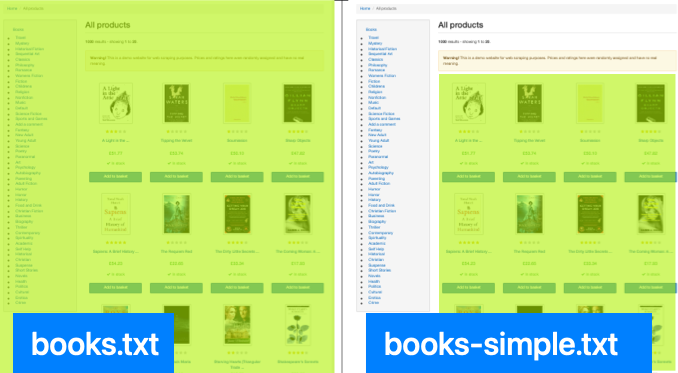
Feel free to take a look at the txt files here:
## AI models feature notes
Instead of using a regular prompt, we need to find out if the AI model has a specific feature for parsing the string. If not, we can still use a simple prompt to do the job.
**OpenAI**
We use OpenAI's new feature, Structured Outputs. Alternatively, we can use Function Calling.
**Gemini API**
Gemini has something called JSON Output. Unfortunately, I'm not able to return JSON format directly. Instead, it returns my data like this:
```json
```json
books: {
...
}
```
```
It includes the triple backtick and json text at the beginning. So, I need to convert it from string to JSON later on.
**Claude API**
Claude has a `function calling` feature as well. Unfortunately, during the test, I found that the usage was more complex. On top of that, using a simple prompt method works well.
Reference: [Claude function calling documentation.](https://docs.anthropic.com/en/docs/build-with-claude/tool-use#json-output)
## Important notes
Here are a few notes from the experiment:
**Data Type**
Defining data type is very important. For example, parsing a `price` could return $20.0 or just number 20\. We need to define the exact format we want for consistent results.
Here is an example prompt I'm using for Claude and Gemini:
```javascript
function getBooksPrompt() {
return `
Parse the HTML and collect only information about books, get all the books, not just partially.
Convert it into a JSON object with the following structure.
No explanation needed, don't response anything except the JSON object:
{
"books": [
{
"title": $title,
"link": $link,
"image": $image,
"star_rating": $star_rating, (number)
"price": $price, (number)
"in_stock": $in_stock_status, (boolean)
},
...
}
`
}
```
**Token usage**
The token usage is very high compared to common usage, like asking questions or having a conversational chat with AI. Since we need to pass the whole HTML, more tokens are naturally required on the AI side.
*More tokens mean more money you have to pay.*
## Parsing Result
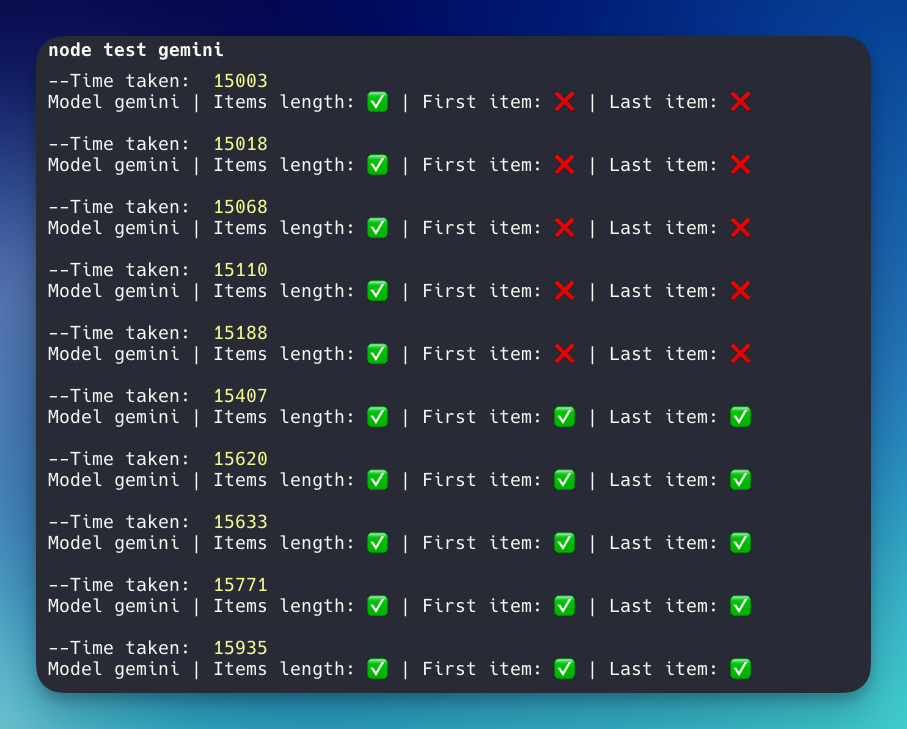
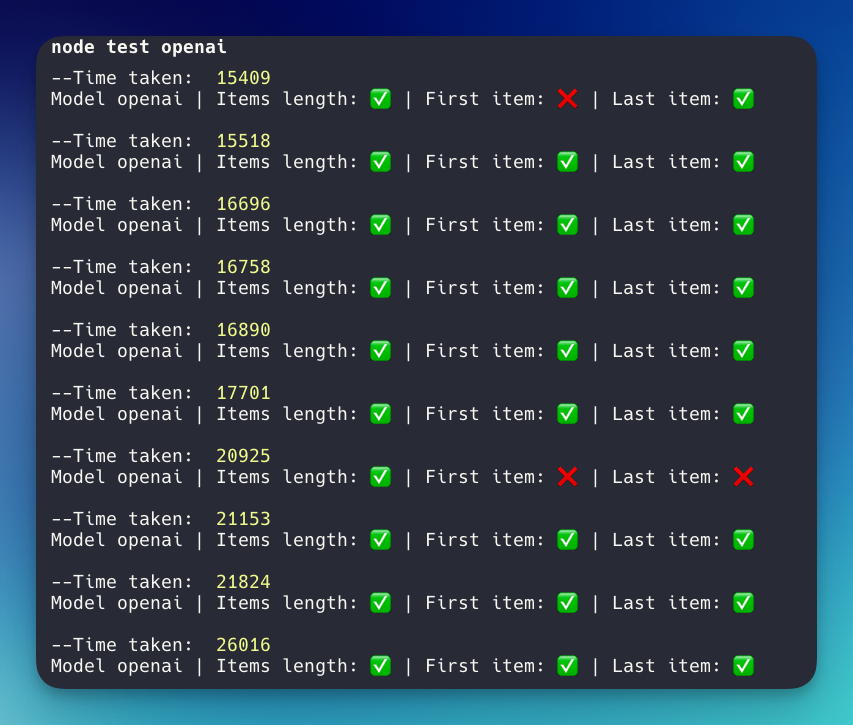
Here are the results of running the parsing program ten times asynchronously for each. We're testing three things:
- the length of the item
- the first item match
- the last item match
> *All the data types, keys, and values must match with the reference to be considered correct.*
**Gemini API**
Gemini API result
> The average time taken for Gemini API is **15,375 milliseconds with 10/30 mistakes.**
**OpenAI API**
OpenAI structured Output results
> The average time taken for OpenAI is **18,889 milliseconds with 3/30 mistakes.**
**Claude API**
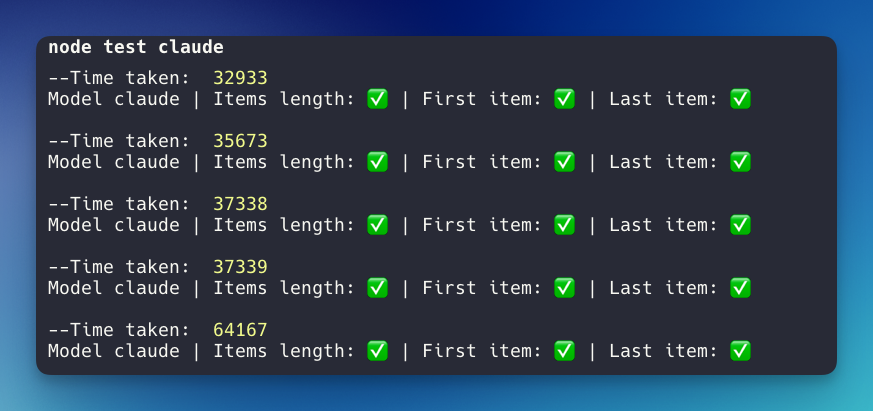
I hit the per-minute rate limit error upon running the Claude API. So, I need to separate the program to run 5 times per minute. Depending on your plan purchase, you can get a higher token.
First test:
Claude AI result
Second test:
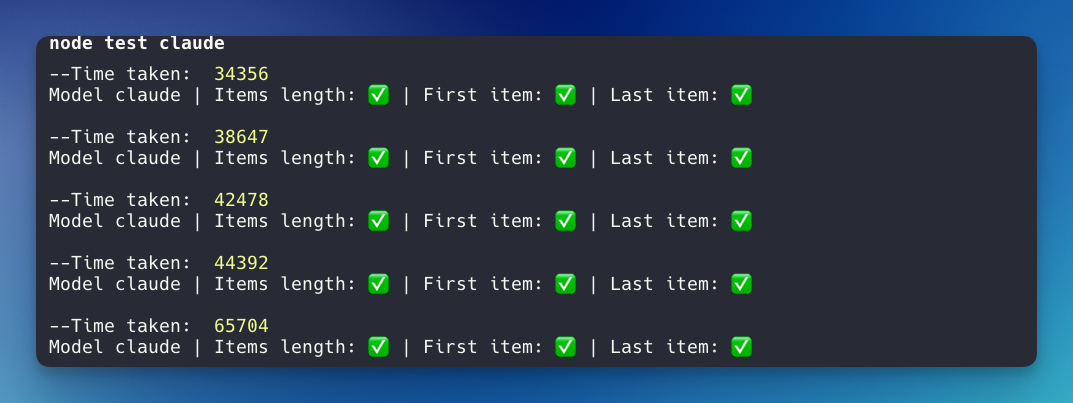
Claude AI second test result
> The average time taken for Claude is **43,302 milliseconds with 0/30 mistakes.** 🤩🤩🤩Perfect score!
## Summary
Based on this little experiment, here is the result:
- The most accurate: *Claude - claude-3-5-sonnet-20240620*
- The fastest: Gemini API - gemini-1.5-flash
- Well balanced | accurate x speed | : OpenAI - gpt-4o-2024-08-06
Feel free to use the code base as a reference or the base layout for your project. I suggest trying different models to determine which is best for your use case.