> ## Content Index
> Fetch the complete content index at: https://serpapi.com/blog/llms.txt
> Use this file to discover other available public pages before exploring further.
# Scrape Google Shopping Tab with Python
- URL: https://serpapi.com/blog/web-scraping-google-shopping-tab-in-python/
- Published: 2022-08-02T12:59:57.000Z
- Updated: 2026-01-28T08:07:14.000Z
- Description: This blog post is about scraping product listing results from Google Shopping Tab using Python.
- Author: Artur Chukhrai
- Tags: Google Shopping, Web Scraping, Python
## What will be scraped
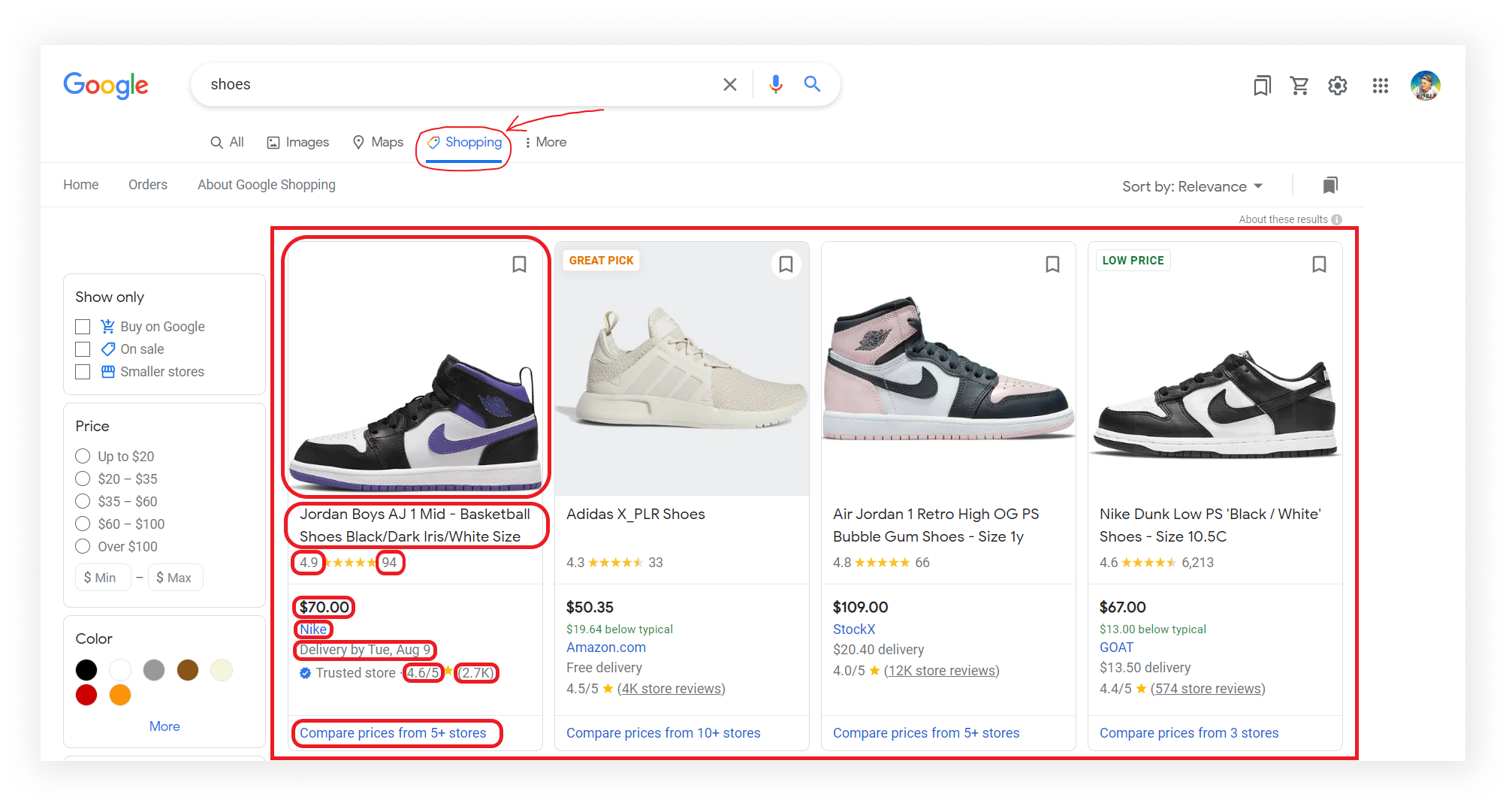
📌Note: If some results are not being retrieved, then some selectors have been changed by Google.
## Using [Google Shopping Results API](https://serpapi.com/shopping-results)
This section is to show the differences between our and DIY solution.
The main difference is that it's a quicker approach. [Google Shopping Results API](https://serpapi.com/shopping-results) will bypass blocks from search engines and you don't have to create the parser from scratch and maintain it.
Example code to integrate:
```python
from serpapi import GoogleSearch
import requests, lxml, json
params = {
"q": "shoes", # search query
"tbm": "shop", # shop results
"location": "Dallas", # location from where search comes from
"hl": "en", # language of the search
"gl": "us", # country of the search
"api_key": "..." # https://serpapi.com/manage-api-key
}
# https://docs.python-requests.org/en/master/user/quickstart/#custom-headers
headers = {
"User-Agent":
"Mozilla/5.0 (Windows NT 10.0; Win64; x64) AppleWebKit/537.36 (KHTML, like Gecko) Chrome/103.0.0.0 Safari/537.36"
}
search = GoogleSearch(params) # where data extraction happens on the SerpApi backend
results = search.get_dict() # JSON -> Python dict
def download_google_shopping_images():
for index, result in enumerate(results["shopping_results"], start=1):
image = requests.get(result['thumbnail'], headers=headers, timeout=30, stream=True)
if image.status_code == 200:
with open(f"images/image_{index}.jpeg", 'wb') as file:
file.write(image.content)
def serpapi_get_google_shopping_data():
google_shopping_data = results["shopping_results"]
# download_google_shopping_images()
print(json.dumps(google_shopping_data, indent=2, ensure_ascii=False))
```
Outputs:
```json
[
{
"position": 1,
"title": "Jordan (PS) Jordan 1 Mid Black/Dark Iris-White",
"link": "https://www.google.com/url?url=https://www.nike.com/t/jordan-1-mid-little-kids-shoes-Rt7WmQ/640734-095%3Fnikemt%3Dtrue&rct=j&q=&esrc=s&sa=U&ved=0ahUKEwiS3MaljJX5AhURILkGHTBYCSUQguUECIQW&usg=AOvVaw1GOVGa9RfptVnLwtJxW13f",
"product_link": "https://www.google.com/shopping/product/2446415938651229617",
"product_id": "2446415938651229617",
"serpapi_product_api": "https://serpapi.com/search.json?device=desktop&engine=google_product&gl=us&google_domain=google.com&hl=en&location=Dallas&product_id=2446415938651229617",
"source": "Nike",
"price": "$70.00",
"extracted_price": 70.0,
"rating": 5.0,
"reviews": 2,
"thumbnail": "https://encrypted-tbn2.gstatic.com/shopping?q=tbn:ANd9GcS_YSNcYQrumsokg4AXKHXCM4kSdA1gWxmFUOZeyqRnf7nR5m8CWJ_-tCNIaNjiZzTYD3ERR0iDXenl0Q_Lswu44VHqIQPpIaxrwS0kVV08NnmLyK1lOphA&usqp=CAE",
"delivery": "Delivery by Sun, Aug 14"
},
... other results
]
```
## DIY Code
```python
import requests, json, re, os
from parsel import Selector
# https://docs.python-requests.org/en/master/user/quickstart/#passing-parameters-in-urls
params = {
"q": "shoes",
"hl": "en", # language
"gl": "us", # country of the search, US -> USA
"tbm": "shop" # google search shopping
}
# https://docs.python-requests.org/en/master/user/quickstart/#custom-headers
headers = {
"User-Agent": "Mozilla/5.0 (Windows NT 10.0; Win64; x64) AppleWebKit/537.36 (KHTML, like Gecko) Chrome/103.0.0.0 Safari/537.36"
}
html = requests.get("https://www.google.com/search", params=params, headers=headers, timeout=30)
selector = Selector(html.text)
def get_original_images():
all_script_tags = "".join(
[
script.replace("", "\n")
for script in selector.css("script").getall()
]
)
image_urls = []
for result in selector.css(".Qlx7of .sh-dgr__grid-result"):
# https://regex101.com/r/udjFUq/1
url_with_unicode = re.findall(rf"var\s?_u='(.*?)';var\s?_i='{result.attrib['data-pck']}';", all_script_tags)
if url_with_unicode:
url_decode = bytes(url_with_unicode[0], 'ascii').decode('unicode-escape')
image_urls.append(url_decode)
# download_original_images(image_urls)
return image_urls
def download_original_images(image_urls):
for index, image_url in enumerate(image_urls, start=1):
image = requests.get(image_url, headers=headers, timeout=30, stream=True)
if image.status_code == 200:
print(f"Downloading {index} image...")
with open(f"images/image_{index}.jpeg", "wb") as file:
file.write(image.content)
def get_suggested_search_data():
google_shopping_data = []
for result, thumbnail in zip(selector.css(".Qlx7of .i0X6df"), get_original_images()):
title = result.css(".tAxDx::text").get()
product_link = "https://www.google.com" + result.css(".Lq5OHe::attr(href)").get()
product_rating = result.css(".NzUzee .Rsc7Yb::text").get()
product_reviews = result.css(".NzUzee > div::text").get()
price = result.css(".a8Pemb::text").get()
store = result.css(".aULzUe::text").get()
store_link = "https://www.google.com" + result.css(".eaGTj div a::attr(href)").get()
delivery = result.css(".vEjMR::text").get()
store_rating_value = result.css(".zLPF4b .XEeQ2 .QIrs8::text").get()
# https://regex101.com/r/kAr8I5/1
store_rating = re.search(r"^\S+", store_rating_value).group() if store_rating_value else store_rating_value
store_reviews_value = result.css(".zLPF4b .XEeQ2 .ugFiYb::text").get()
# https://regex101.com/r/axCQAX/1
store_reviews = re.search(r"^\(?(\S+)", store_reviews_value).group() if store_reviews_value else store_reviews_value
store_reviews_link_value = result.css(".zLPF4b .XEeQ2 .QhE5Fb::attr(href)").get()
store_reviews_link = "https://www.google.com" + store_reviews_link_value if store_reviews_link_value else store_reviews_link_value
compare_prices_link_value = result.css(".Ldx8hd .iXEZD::attr(href)").get()
compare_prices_link = "https://www.google.com" + compare_prices_link_value if compare_prices_link_value else compare_prices_link_value
google_shopping_data.append({
"title": title,
"product_link": product_link,
"product_rating": product_rating,
"product_reviews": product_reviews,
"price": price,
"store": store,
"thumbnail": thumbnail,
"store_link": store_link,
"delivery": delivery,
"store_rating": store_rating,
"store_reviews": store_reviews,
"store_reviews_link": store_reviews_link,
"compare_prices_link": compare_prices_link,
})
print(json.dumps(google_shopping_data, indent=2, ensure_ascii=False))
get_suggested_search_data()
```
## Prerequisites
**Install libraries**:
```lang-none
pip install requests parsel google-search-results
```
`google-search-results` is a SerpApi API package that will be shown at the end as an alternative solution.
**Reduce the chance of being blocked**
Make sure you're using [request headers](https://docs.python-requests.org/en/master/user/quickstart/#custom-headers) [user-agent](https://developer.mozilla.org/en-US/docs/Glossary/User%5Fagent) to act as a "real" user visit. Because default `requests` `user-agent` is [python-requests](https://github.com/psf/requests/blob/589c4547338b592b1fb77c65663d8aa6fbb7e38b/requests/utils.py#L808-L814) and websites understand that it's most likely a script that sends a request. [Check what's your user-agent](https://www.whatismybrowser.com/detect/what-is-my-user-agent/).
There's a [how to reduce the chance of being blocked while web scraping blog post](https://serpapi.com/blog/how-to-reduce-chance-of-being-blocked-while-web/) that can get you familiar with basic and more advanced approaches.
## Code Explanation
Import libraries:
```python
import requests, json, re
from parsel import Selector
from serpapi import GoogleSearch
```
| Library | Purpose |
| ---------------------------------------------------------------------- | ------------------------------------------------------------------------------------------------------ |
| [Selector](https://parsel.readthedocs.io/en/latest/) | XML/HTML parser that have full [XPath](https://en.wikipedia.org/wiki/XPath) and CSS selectors support. |
| [requests](https://requests.readthedocs.io/en/latest/user/quickstart/) | to make a request to the website. |
| [lxml](https://lxml.de/) | to process XML/HTML documents fast. |
| [json](https://docs.python.org/3/library/json.html) | to convert extracted data to a JSON object. |
| [re](https://docs.python.org/3/library/re.html) | to extract parts of the data via regular expression. |
Create URL parameter and request headers:
```python
# https://docs.python-requests.org/en/master/user/quickstart/#passing-parameters-in-urls
params = {
"q": "shoes",
"hl": "en", # language
"gl": "us", # country of the search, US -> USA
"tbm": "shop" # google search shopping
}
# https://docs.python-requests.org/en/master/user/quickstart/#custom-headers
headers = {
"User-Agent": "Mozilla/5.0 (Windows NT 10.0; Win64; x64) AppleWebKit/537.36 (KHTML, like Gecko) Chrome/103.0.0.0 Safari/537.36"
}
```
| Code | Explanation |
| ------------------------------------------------------------------------------------------------- | --------------------------------------------------------------------------------------------------------------------------------------------------------------------------------------------------------------------------------------------------------------------------------------------------------------------------------------------------------------------------------------------------------------------------------------------------------------------------------------------------------------------------- |
| [params ](https://docs.python-requests.org/en/master/user/quickstart/#passing-parameters-in-urls) | a prettier way of passing URL parameters to a request. |
| [user-agent](https://developer.mozilla.org/en-US/docs/Glossary/User%5Fagent) | to act as a "real" user request from the browser by passing it to [request headers](https://docs.python-requests.org/en/master/user/quickstart/#custom-headers). [Default requests user-agent is a python-reqeusts](https://github.com/psf/requests/blob/589c4547338b592b1fb77c65663d8aa6fbb7e38b/requests/utils.py#L808-L814) so websites might understand that it's a bot or a script and block the request to the website. [Check what's your user-agent](https://www.whatismybrowser.com/detect/what-is-my-user-agent). |
Make a request, pass created request parameters and headers. Request returned HTML to `Selector`:
```python
html = requests.get("https://www.google.com/search", params=params, headers=headers, timeout=30)
selector = Selector(html.text)
```
| Code | Explanation |
| ---------------------------------------------------------------------------------- | ----------------------------------------------------- |
| [timeout=30](https://docs.python-requests.org/en/master/user/quickstart/#timeouts) | to stop waiting for response after 30 seconds. |
| Selector() | where returned HTML data will be processed by parsel. |
### Get original images
To find a proper thumbnail resolution, we need to open the page's source code `(CTRL+U)` and look for the `", "\n")
for script in selector.css("script").getall()
]
)
```
| Code | Explanation |
| -------------------------------------------------------------------------------- | ---------------------------------------------------------------------------------------------------------------------- |
| ["".join()](https://docs.python.org/3/library/stdtypes.html#str.join) | to concatenate a list into a string. |
| [replace()](https://docs.python.org/3/library/stdtypes.html#str.replace) | to replace all occurrences of the old substring with the new one so that the regular expression is executed correctly. |
| [getall()](https://github.com/scrapy/parsel/blob/master/parsel/selector.py#L180) | to return a list with all results. |
Next, our task is to find the script tags containing information about the image URL and its ID. To do this, we can use a [for loop](https://docs.python.org/3/tutorial/controlflow.html#for-statements) and iterate the `list` of matched elements.
The `for` loop iterates through all the images on the page (except for ads or shop offers) and find the ID of the current image in the `all_script_tags` list using [regular expression](https://docs.python.org/3/library/re.html) in order to extract a specific image, not a random one, by checking its ID `var _i`:
```python
for result in selector.css(".Qlx7of .sh-dgr__grid-result"):
# https://regex101.com/r/udjFUq/1
url_with_unicode = re.findall(rf"var\s?_u='(.*?)';var\s?_i='{result.attrib['data-pck']}';", all_script_tags)
```
Here's a regular expression example to extract image URL and its ID from a `", "\n")
for script in selector.css("script").getall()
]
)
image_urls = []
for result in selector.css(".Qlx7of .sh-dgr__grid-result"):
# https://regex101.com/r/udjFUq/1
url_with_unicode = re.findall(rf"var\s?_u='(.*?)';var\s?_i='{result.attrib['data-pck']}';", all_script_tags)
if url_with_unicode:
url_decode = bytes(url_with_unicode[0], 'ascii').decode('unicode-escape')
image_urls.append(url_decode)
# download_original_images(image_urls)
return image_urls
```
Print returned data:
```lang-none
[
"https://encrypted-tbn2.gstatic.com/shopping?q=tbn:ANd9GcS_YSNcYQrumsokg4AXKHXCM4kSdA1gWxmFUOZeyqRnf7nR5m8CWJ_-tCNIaNjiZzTYD3ERR0iDXenl0Q_Lswu44VHqIQPpIaxrwS0kVV08NnmLyK1lOphA&usqp=CAE",
"https://encrypted-tbn3.gstatic.com/shopping?q=tbn:ANd9GcTshSE9GfoLG_mbwZLwqx_yqnGsjR7tvuSPqmOnM8Z6uLToZ_p4DeHXa0obu5sh8QSp3vfIHuaLn5uiLIQHFVXsFb6lX0QwbSbLwS1R7nBiJLPesluLfR2T&usqp=CAE",
"https://encrypted-tbn0.gstatic.com/shopping?q=tbn:ANd9GcTRbSGCkFzgXlPrVK3EdoBg8oqGZq4mpyLreYFGsRplcXwBBD1tUMzUEU_yiFNyo8sOimNHpaVMGgxeCk3EDXjhOu879Jb3D8JzP2sv2iP0h7vJywzMXazx&usqp=CAE",
"https://encrypted-tbn3.gstatic.com/shopping?q=tbn:ANd9GcQRPOrOELZafWAURXGD2weyznXQn-RKKsX7M9l7JoAcecF-eFwyTU-IDIzorSt4CYtTQwfh3Mr3gb7xgNW15ekBvzGUS2QGuP5FgufKAhB3rMr6saJy-dgxveNR&usqp=CAE",
"https://encrypted-tbn0.gstatic.com/shopping?q=tbn:ANd9GcS_dJ1xHzSAdvHdqnSUV8WoYXPI7boeoqQuhF71iG8-F4gKCrFdevOWILnjO1ePA-wDYtiRuFO4K2pFcEJ3DNO0qhtN6OrL2RLlauy3EkHqdvKSx8wrAH7NHg&usqp=CAE",
"https://encrypted-tbn2.gstatic.com/shopping?q=tbn:ANd9GcRNPyBYHEhBzyKUlZs8nxb25rfeBmAhleNK0B1ClLbCVamO-IYlGgfZbKPYp9cDydlBvxbkaylGXmr2IakZnnsqGBo-OynpBs2yrgNIGqH_vu7lLOkkLuWI5A&usqp=CAE",
"https://encrypted-tbn3.gstatic.com/shopping?q=tbn:ANd9GcR2sF3ADV112NjwYLlS7HOWRgEYHqx8FCMjXaYwQaCcXNKwhQqkPfQTKVr0FURG4lDt0OsNKXCZI3eiKsDRrLGD_lsM9MyhUjkf6l-C5Mb_pk6bJyqypcxq&usqp=CAE",
"https://encrypted-tbn1.gstatic.com/shopping?q=tbn:ANd9GcSp8b4L3ckI6Xqv-HGv8b_a_62OOXHn4I3mC4M2DycS9CqoeIj5uClX24vL_Pwzx3ZtLbUtArVo1pqmIythL-gucrx-z6DwRsJPF4Swp2rB9JEbjeG6GokLMw&usqp=CAE",
"https://encrypted-tbn1.gstatic.com/shopping?q=tbn:ANd9GcQO3t4RziWLeRDDGzY7ZAbmUS7oH0RfNEZ_tGJLJwcijroa1zE2qnA8vG6XCaGd99lbMp3e2O2-GFCnz9SWBf7g7zSJG4DnYTyB5Ib6InMOAOfU5oebGNGx&usqp=CAE",
"https://encrypted-tbn2.gstatic.com/shopping?q=tbn:ANd9GcS9mRGTiqUkVAZHjVnpEIiVIyW9W6haxbitsHXiMgR5Ibf4wC4aqvFclwUe6VIU75Qg_Z84dEiEhCIYc1V8uOEOIZaGESfmQwrW-3-2LUbCQEhqEHlyP_x7&usqp=CAE",
... other results
]
```
### Download original images
We now have a list with all the correct URLs. We use the same `for` loop with the [enumerate() built-in function](https://docs.python.org/3/library/functions.html#enumerate). This function adds a counter to an iterable and returns it. The counter is needed to assign a unique number to each image at the saving stage (if you need to save them).
In each iteration of the loop, you must follow the current link and download the image. You can use [with open() context manager](https://docs.python.org/3/library/functions.html#open) to save the image locally.
```python
def download_original_images(image_urls):
for index, image_url in enumerate(image_urls, start=1):
image = requests.get(image_url, headers=headers, timeout=30, stream=True)
if image.status_code == 200:
print(f"Downloading {index} image...")
with open(f"images/image_{index}.jpeg", "wb") as file:
file.write(image.content)
```
In the gif below, I demonstrate how this function works:
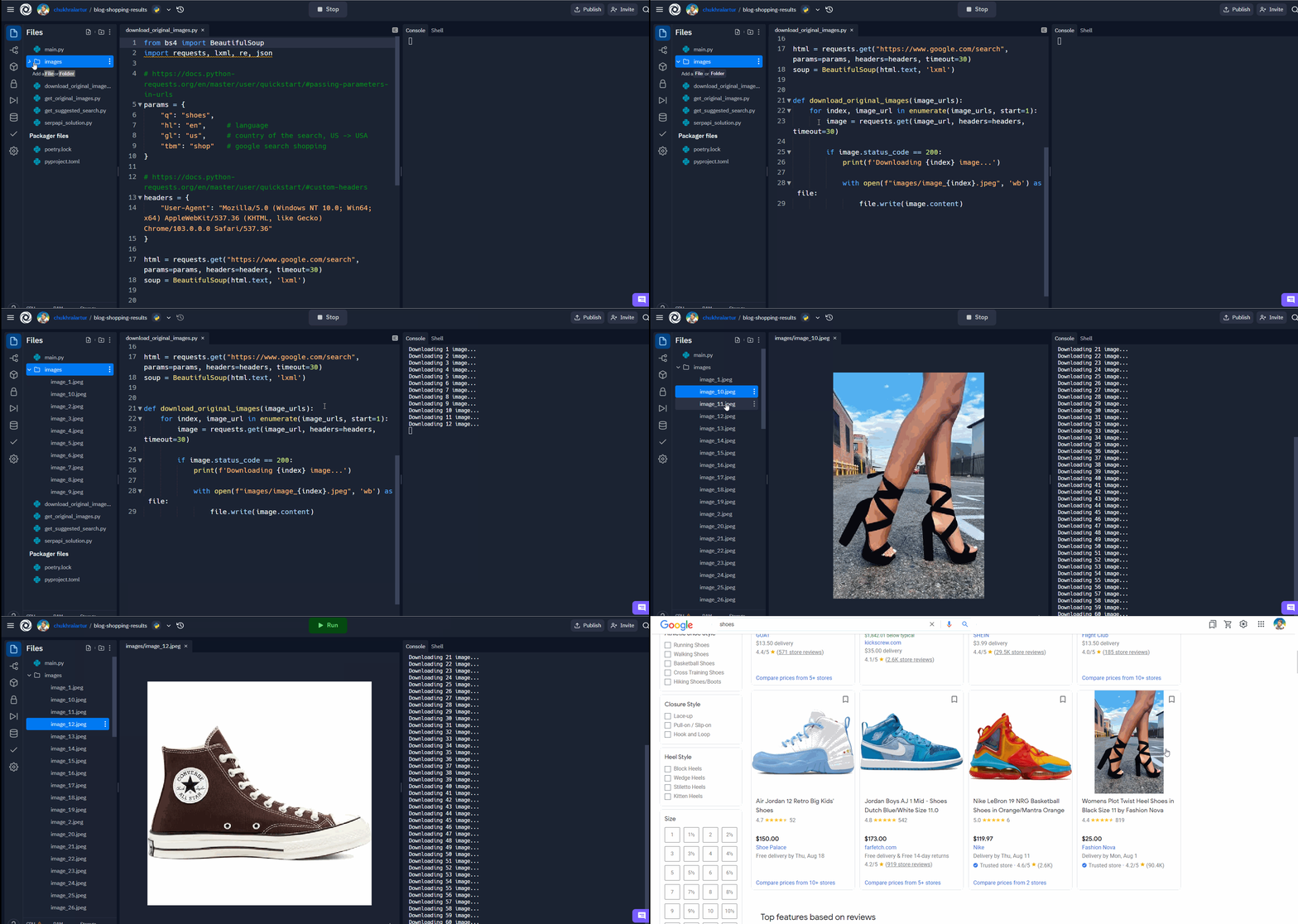
📌Note: You may notice that the images do not load in the same order they appear on the site. This is because Google renders pages for each user in a unique way based on their location, search history, etc. You can learn more by reading this post: [Reasons Google Search Results Vary Dramatically](https://www.webpresencesolutions.net/7-reasons-google-search-results-vary-dramatically/).
### Get suggested search data
In this function, I use the [zip() built-in function](https://docs.python.org/3/library/functions.html#zip), which allows you to iterate through two iterables at once, the first iterable is the selector of all product listings, the second is an `list` of thumbnail URLs returned by the `get_original_images()` function.
You may notice that some data may be missing from some product cards:
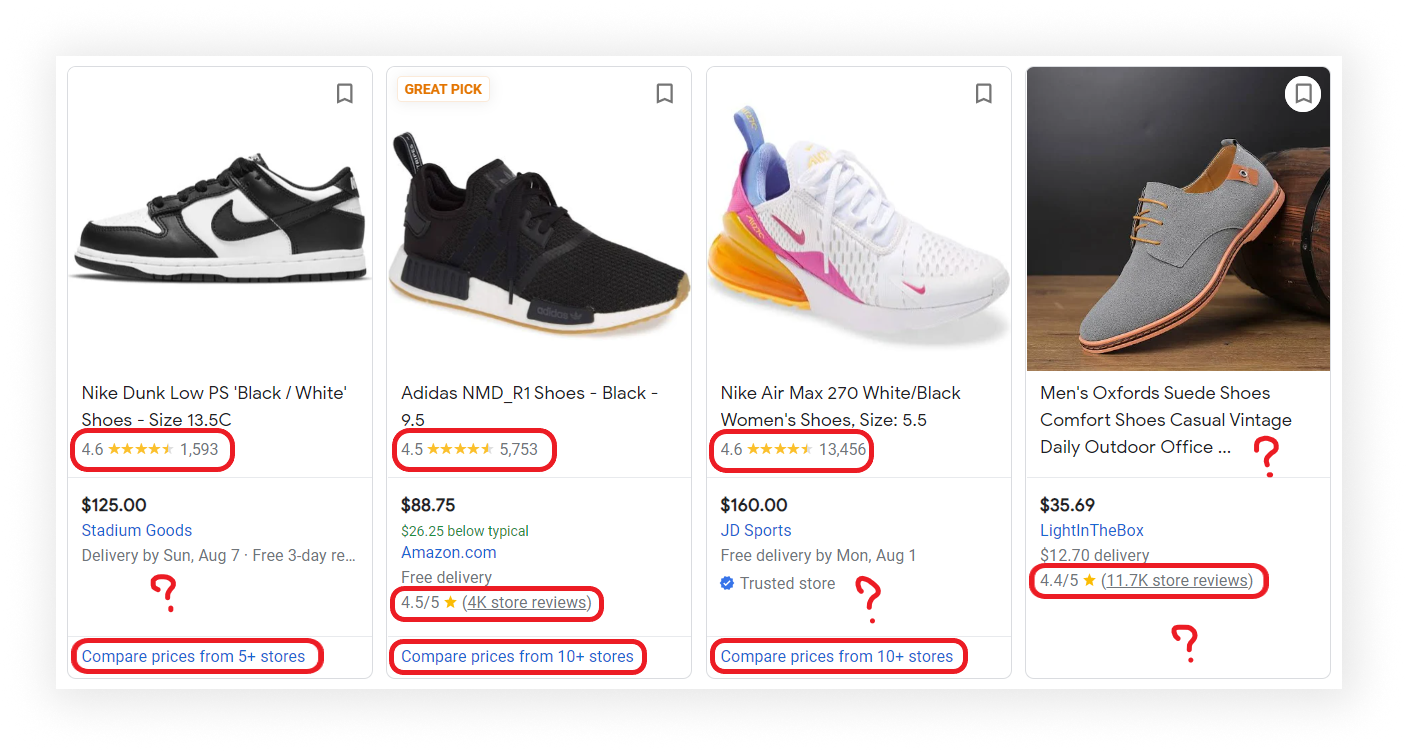
This function uses the [Parsel library](https://parsel.readthedocs.io/en/latest/) to avoid the use of `exceptions`. If you try to parse non-existent data, the value will automatically be written to `None` and the program will not stop. As a result, all information about the product is added to `google_shopping_data` `list`:
```python
def get_suggested_search_data():
google_shopping_data = []
for result, thumbnail in zip(selector.css(".Qlx7of .i0X6df"), get_original_images()):
title = result.css(".tAxDx::text").get()
product_link = "https://www.google.com" + result.css(".Lq5OHe::attr(href)").get()
product_rating = result.css(".NzUzee .Rsc7Yb::text").get()
product_reviews = result.css(".NzUzee > div::text").get()
price = result.css(".a8Pemb::text").get()
store = result.css(".aULzUe::text").get()
store_link = "https://www.google.com" + result.css(".eaGTj div a::attr(href)").get()
delivery = result.css(".vEjMR::text").get()
store_rating_value = result.css(".zLPF4b .XEeQ2 .QIrs8::text").get()
# https://regex101.com/r/kAr8I5/1
store_rating = re.search(r"^\S+", store_rating_value).group() if store_rating_value else store_rating_value
store_reviews_value = result.css(".zLPF4b .XEeQ2 .ugFiYb::text").get()
# https://regex101.com/r/axCQAX/1
store_reviews = re.search(r"^\(?(\S+)", store_reviews_value).group() if store_reviews_value else store_reviews_value
store_reviews_link_value = result.css(".zLPF4b .XEeQ2 .QhE5Fb::attr(href)").get()
store_reviews_link = "https://www.google.com" + store_reviews_link_value if store_reviews_link_value else store_reviews_link_value
compare_prices_link_value = result.css(".Ldx8hd .iXEZD::attr(href)").get()
compare_prices_link = "https://www.google.com" + compare_prices_link_value if compare_prices_link_value else compare_prices_link_value
google_shopping_data.append({
"title": title,
"product_link": product_link,
"product_rating": product_rating,
"product_reviews": product_reviews,
"price": price,
"store": store,
"thumbnail": thumbnail,
"store_link": store_link,
"delivery": delivery,
"store_rating": store_rating,
"store_reviews": store_reviews,
"store_reviews_link": store_reviews_link,
"compare_prices_link": compare_prices_link,
})
print(json.dumps(google_shopping_data, indent=2, ensure_ascii=False))
```
| Code | Explanation |
| ----------------------------------------------------------------------------------------------------------------------------------------------- | --------------------------------------------------------------------------------------------------------------------------------------------------------------------------------------------------------------------------------------------------------------------------------------------- |
| google\_shopping\_data | a temporary list where extracted data will be [appended](https://www.w3schools.com/python/ref%5Flist%5Fappend.asp) at the end of the function. |
| [zip()](https://docs.python.org/3/library/functions.html#zip) | to iterate over multiple iterables in parralel. Keep in mind that zip is used on purpose. [zip() ends with the shortest iterator while zip\_longest() iterates up to the length of the longest iterator](https://stackoverflow.com/questions/59119751/zip-and-zip-longest/59119827#59119827). |
| [css()](https://parsel.readthedocs.io/en/latest/usage.html#using-selectors) | to access elements by the passed selector. |
| [::text or ::attr()](https://github.com/scrapy/parsel/blob/90397dcd0b2c1cbb91e44f65c50f9e11628ba028/parsel/csstranslator.py#L48-L51) | to extract textual or attribute data from the node. |
| [get()](https://parsel.readthedocs.io/en/latest/usage.html#usage) | to actually extract the textual data. |
| [search()](https://docs.python.org/3/library/re.html#re.search) | to search for a pattern in a string and return the corresponding match object. |
| [group()](https://docs.python.org/3/library/re.html#re.Match.group) | to extract the found element from the match object. |
| google\_shopping\_data.append({}) | to [append extracted images data to a list](https://www.w3schools.com/python/ref%5Flist%5Fappend.asp) as a dictionary. |
Print returned data:
```json
[
{
"title": "Jordan Boys AJ 1 Mid - Basketball Shoes Black/Dark Iris/White Size 11.0",
"product_link": "https://www.google.com/shopping/product/2446415938651229617?q=shoes&hl=en&gl=us&prds=eto:8229454466840606844_0,pid:299671923759156329,rsk:PC_2261195288052060612&sa=X&ved=0ahUKEwi5qJ-i1pH5AhU1j2oFHYH0A1EQ8wIIkhQ",
"product_rating": "5.0",
"product_reviews": "2",
"price": "$70.00",
"store": "Nike",
"thumbnail": "https://encrypted-tbn2.gstatic.com/shopping?q=tbn:ANd9GcS_YSNcYQrumsokg4AXKHXCM4kSdA1gWxmFUOZeyqRnf7nR5m8CWJ_-tCNIaNjiZzTYD3ERR0iDXenl0Q_Lswu44VHqIQPpIaxrwS0kVV08NnmLyK1lOphA&usqp=CAE",
"store_link": "https://www.google.com/url?url=https://www.nike.com/t/jordan-1-mid-little-kids-shoes-Rt7WmQ/640734-095%3Fnikemt%3Dtrue&rct=j&q=&esrc=s&sa=U&ved=0ahUKEwi5qJ-i1pH5AhU1j2oFHYH0A1EQguUECJQU&usg=AOvVaw33rVk6a7KZ7tSuibaJiP8L",
"delivery": "Delivery by Thu, Aug 11",
"store_rating": "4.6",
"store_reviews": "2.6K",
"store_reviews_link": "https://www.google.com/url?url=https://www.google.com/shopping/ratings/account/metrics%3Fq%3Dnike.com%26c%3DUS%26v%3D18%26hl%3Den&rct=j&q=&esrc=s&sa=U&ved=0ahUKEwi5qJ-i1pH5AhU1j2oFHYH0A1EQ9-wCCJsU&usg=AOvVaw3pWu7Rw-rfT2lXuzldJ4f-",
"compare_prices_link": "https://www.google.com/shopping/product/2446415938651229617/offers?q=shoes&hl=en&gl=us&prds=eto:8229454466840606844_0,pid:299671923759156329,rsk:PC_2261195288052060612&sa=X&ved=0ahUKEwi5qJ-i1pH5AhU1j2oFHYH0A1EQ3q4ECJwU"
},
... other results
]
```
## Links
- [Code in the online IDE](https://replit.com/@chukhraiartur/blog-shopping-results#bs4%5Fsuggested%5Fsearch.py)
- [Google Shopping Results API](https://serpapi.com/shopping-results)
Join us on [Twitter](https://twitter.com/serp%5Fapi) | [YouTube](https://www.youtube.com/channel/UCUgIHlYBOD3yA3yDIRhg%5Fmg)
Add a [Feature Request](https://github.com/serpapi/public-roadmap/issues)💫 or a [Bug](https://github.com/serpapi/public-roadmap/issues)🐞