> ## Content Index
> Fetch the complete content index at: https://serpapi.com/blog/llms.txt
> Use this file to discover other available public pages before exploring further.
# How to use curl in Python (and its alternative)
- URL: https://serpapi.com/blog/python-curl-and-alternative/
- Published: 2023-12-12T23:13:09.000Z
- Updated: 2023-12-13T23:48:04.000Z
- Description: Curl is a handy tool for moving data through URLs. If you like using Python, you might want to use curl with it. But there's a better way to do what curl does right inside Python.
- Author: Hilman Ramadhan
- Tags: Python
Curl is a handy tool for moving data through URLs. If you like using Python, you might want to use curl with it. But there's a better way to do what curl does inside Python. *We'll show you how to handle data transfer in Python both with Curl and without Curl.*

use cURL with Python illustration
## How to use cURL in Python?
We have two options to run cURL in the Python code:
\- Using subprocess to run cURL. It's like using a command prompt (Terminal) from Python.
\- Using pycurl. It's a library that acts as an interface between Python and libcurl.
Even though we can run cURL with those options, it's not the recommended way if you just want to fetch data or request a web page. There's a better alternative like: `requests` or built-in http.client.
> If you're interested in [how to utilize cURL for web scraping and its basic commands, feel free to read this post.](https://serpapi.com/blog/web-scraping-with-curl-fetching-raw-html-data/)
Here are the links to the tools mentioned:
[\- subprocess python ](https://docs.python.org/3/library/subprocess.html)[\- pycurl ](https://pypi.org/project/pycurl/)[\- requests ](https://requests.readthedocs.io/en/latest/)[\- http.client](https://docs.python.org/3/library/http.client.html)
Let's take a look at how to use curl with each of the methods above.
## How to use curl with Python's subprocessor
Here is an example of how you can use curl using the subprocess.
```python
import subprocess
# The command you would type in the terminal
command = ["curl", "https://www.example.com"]
# Run the command
result = subprocess.run(command, stdout=subprocess.PIPE, stderr=subprocess.PIPE, text=True)
# Get the output and error message (if any)
output = result.stdout
error = result.stderr
# Check if it was successful
if result.returncode == 0:
print("Success:")
print(output)
else:
print("Error:")
print(error)
```
## How to use cURL with pycurl library
`pycurl` is a Python interface to the `libcurl` library, which is what `curl` is used under the hood. It allows you to use `curl`'s capabilities directly within Python. Here's a simple example of how to use `pycurl` to perform a GET request to a given URL and print the response:
```python
import pycurl
from io import BytesIO
# The URL to send the request to
url = "https://www.example.com"
# Create a BytesIO object to capture the output
buffer = BytesIO()
# Initialize a pycurl object
c = pycurl.Curl()
# Set the URL
c.setopt(c.URL, url)
# Write the output to the BytesIO buffer
c.setopt(c.WRITEDATA, buffer)
# Perform the request
c.perform()
# Get the HTTP response code
http_code = c.getinfo(c.RESPONSE_CODE)
# Close the pycurl object
c.close()
# Get the content from the BytesIO buffer
body = buffer.getvalue().decode('utf-8')
# Check if it was successful
if http_code == 200:
print("Success:")
print(body)
else:
print("Error:")
print(http_code)
```
There's a high possibility that you'll face HTTPS/SSL issues when using Pycurl. It's recommended to install and use [certifi](https://pypi.org/project/certifi/) alongside pycurl.
Now that we've seen two "raw" methods of using cURL with Python. Now let's take a look at the easy way to request a web page using `requests`.
## Using `requests` as an alternative to cURL
*"Requests is an elegant and simple HTTP library for Python, built for human beings."* \- requests documentation.
We can perform a GET, POST, or other HTTP request in Python `requests` instead of `cURL`. It has an easy-to-use interface to work with.
**Is the library requests using curl under the hood?**
No, the `requests` library in Python does not use `curl` or `libcurl` under the hood. Instead, `requests` is built on top of `urllib3`, which is another Python library that provides HTTP client functionality.
**Online tool converter**
> I found an interactive online tool where you can convert cURL command to any programming language including Python, which will convert the command intro `requests` library:
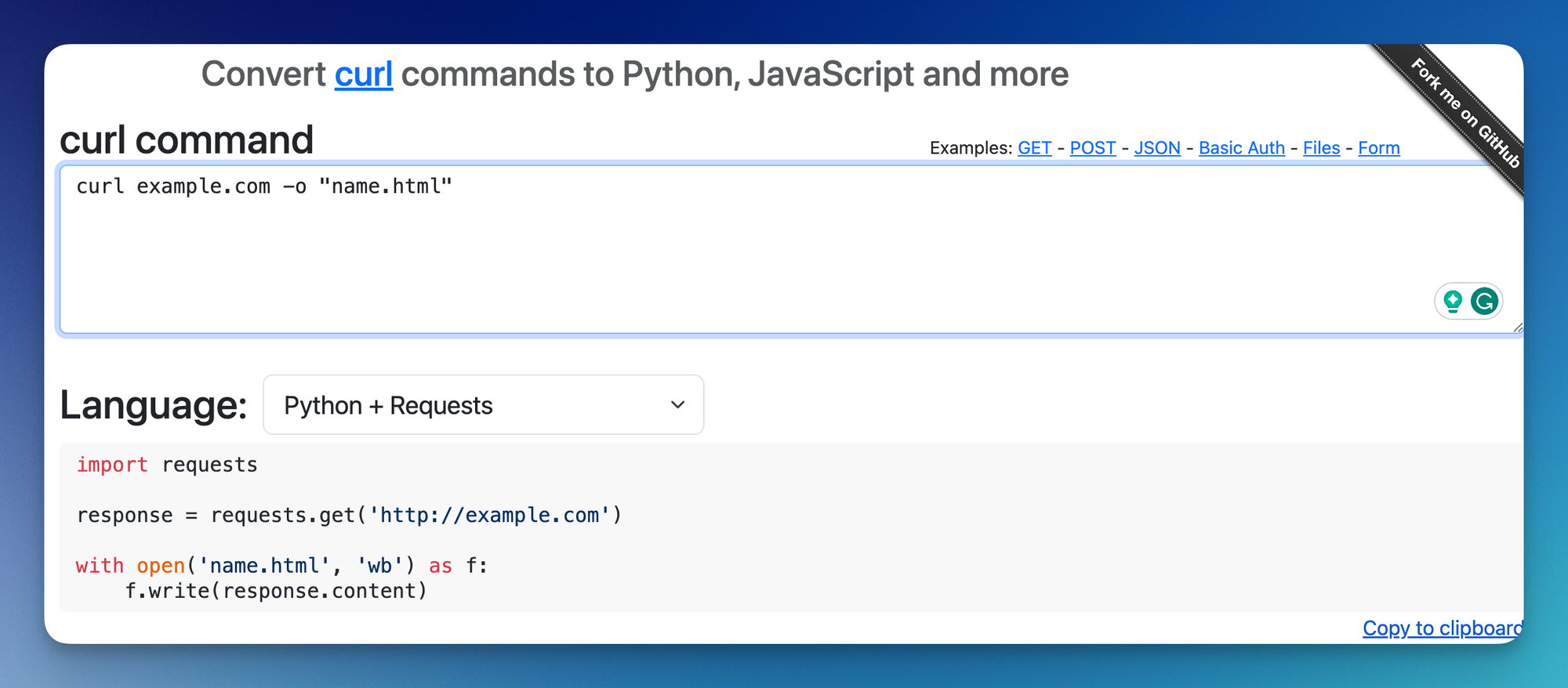
curlconverter, online tool to convert curl command to Python
**Here are a few `requests` code samples:**
### Basic GET request in `requests`
```python
import requests
response = requests.get('http://example.com')
```
It's equivalent to: `curl example.com`
> I'll skip the `import requests` for the rest of the sample.
### Save the raw HTML in a file
Since we're writing in a programming language, we now have the flexibility to mix and match this code with other actions as well. For example, in order to save a file, we can use the `open` and `write` method from Python.
```python
response = requests.get('http://example.com')
with open('index.html', 'wb') as f:
f.write(response.content)
```
Equivalent to `curl example.com -o "index.html"`
### Send a post request
Here's how we can send a post request with the `requests` library. We can slowly start seeing the benefits of using this library.
```
data = {
'param1': 'value1',
'param2': 'value2',
}
response = requests.post('http://example.com', data=data)
```
Equivalent to: `curl -d "param1=value1¶m2=value2" -X POST `
### Requests with authentication
```python
from requests.auth import HTTPBasicAuth
basic = HTTPBasicAuth('user', 'pass')
requests.get('https://httpbin.org/basic-auth/user/pass', auth=basic)
```
Equivalent to: `curl -u username:password `
More on [authentication](https://requests.readthedocs.io/en/latest/user/authentication/).
### Send a JSON data
```python
headers = {
# Already added when you pass json=
# 'Content-Type': 'application/json',
'Accept': 'application/json',
}
json_data = {
'tool': 'curl',
}
response = requests.post('https://example.com/', headers=headers, json=json_data)
```
Equivalent to: `curl --json '{"tool": "curl"}' https://example.com/`
### Adding a custom header
Any header information can be put in the header key.
```python
headers = {
'X-Custom-Header': 'value',
}
response = requests.get('http://example.com', headers=headers)
```
Equivalent to: `curl -H "X-Custom-Header: value" `
### Simulate using a user agent
Like above, user agent information can be attached to the headers.
```python
headers = {
'User-Agent': 'User-Agent-String',
}
response = requests.get('http://example.com', headers=headers)
```
Equivalent to: `curl -A "User-Agent-String" `
### Using proxies
The `requests` library has the \`proxies\` key as a parameter.
```
proxies = {
'http': 'http://proxyserver:port',
'https': 'http://proxyserver:port',
}
response = requests.get('http://example.com', proxies=proxies)
```
Equivalent to: `curl -x http://proxyserver:port http://example.com`acts
## What's the benefit of using requests instead of curl?
Using `requests` in Python instead of `curl` for making HTTP requests has several benefits:
1. **Ease of Use**: `requests` is a Python library, making it more intuitive to use within a Python environment. Its syntax is straightforward and user-friendly, especially for those already familiar with Python. This contrasts with `curl`, which is a command-line tool requiring a different syntax that can be less intuitive for those not accustomed to command-line interfaces.
2. **Readability**: Code written using `requests` is generally more readable and maintainable. This is particularly beneficial in larger projects or when working in a team, as it makes it easier for others to understand and contribute to the code.
3. **Integration with Python Code**: Since `requests` is a Python library that integrates seamlessly with other Python code and features. This includes error handling through exceptions, integration with Python's debugging tools, and compatibility with other Python libraries.
4. **Support for Pythonic Idioms**: `requests` supports Pythonic idioms, like context managers for session management, which makes it more in line with common Python practices.
5. **Flexibility and Features**: `requests` offer a high degree of flexibility and comes with many out of the box features, like support for various authentication methods, connection pooling, and more.
While `curl` is a powerful tool with its own set of advantages, especially in non-Python environments or for quick command-line use, `requests` is often more suitable for Python applications due to its ease of use, readability, and integration with Python's ecosystem.
## FAQ
**Is it possible to use cURL with Python?**
Yes, it's possible to use cURL in Python using a subprocessor or library like pycurl.
**What's the alternative for cURL in Python?**
The `requests` library is a good alternative for cURL in Python.