> ## Content Index
> Fetch the complete content index at: https://serpapi.com/blog/llms.txt
> Use this file to discover other available public pages before exploring further.
# OpenAI new Structured Output feature (NodeJS tutorial)
- URL: https://serpapi.com/blog/openai-new-structured-output-feature-nodejs-tutorial/
- Published: 2024-08-15T01:04:42.000Z
- Updated: 2024-08-19T22:42:32.000Z
- Description: Learn how to extract a nice JSON format structured data from a raw text using new OpenAI feature: Structured Outputs
- Author: Hilman Ramadhan
- Tags: openai
JSON is a popular format for data exchange between applications. With *Structured Outputs,* you can ensure that responses consistently follow your provided JSON Schema, eliminating concerns about missing required keys or generating incorrect values.
This has been possible so far using [Function Calling by OpenAI](https://serpapi.com/blog/connect-openai-with-external-apis-with-function-calling/). Recently, OpenAI announced a new feature called "Structured Output" to guarantee that the model’s response will conform to a particular schema. See the [announcement here](https://openai.com/index/introducing-structured-outputs-in-the-api/).
Structured output by OpenAI
**Video Tutorial**
If you prefer to watch a video, here it is:
## Structured Output NodeJS tutorial
Let's see how to use this with the NodeJS SDK.
**Step 1: Project initialization**
Create a new project with NPM.
```
npm init -y
```
Update your `package.json` to use the javascript module system. Add this to the code block.
```
"type": "module"
```
Install the OpenAI and Zod packages. OpenAI uses Zod to help us with the type declaration.
```
npm i openai zod --save
```
**Step 2: Prepare the packages**
Create a new `index.js` file to write our code.
```javascript
import OpenAI from 'openai';
import { zodResponseFormat } from 'openai/helpers/zod';
import { z } from 'zod';
const { OPENAI_API_KEY } = process.env;
// Set up OpenAI Client
const openai = new OpenAI({
apiKey: OPENAI_API_KEY,
});
```
Don't forget to export your API Key using that key name. Go to your terminal and cd into your directory.
```
export OPENAI_API_KEY=YOUR_ACTUAL_API_KEY
```
**Step 3: Basic sample**
Let's try this new feature! First, we need to create the final format of the JSON that we need. We'll create this format using [Zod](https://zod.dev/). In this sample, I'm going to create a reminder app that can take a prompt and separate the data between the **assignee, task, and time.**
```javascript
const InstructionFormat = z.object({
time: z.string(),
task: z.string(),
assignee: z.string(),
});
```
Here is what the function looks like. Please note that I need to wrap my function inside an async function since I need to use the `await` feature.
```javascript
async function run(){
const completion = await openai.beta.chat.completions.parse({
model: "gpt-4o-2024-08-06",
messages: [
{ role: "system", content: "Extract the todo information from the prompt." },
{ role: "user", content: "Alice need to finish her math homework on 12th August 2024 next week. Don't forget!" },
],
response_format: zodResponseFormat(InstructionFormat, "instruction"),
});
console.log(completion.choices[0].message.parsed)
}
run()
```
Go to the terminal and run this function `node index`
Here is the result:
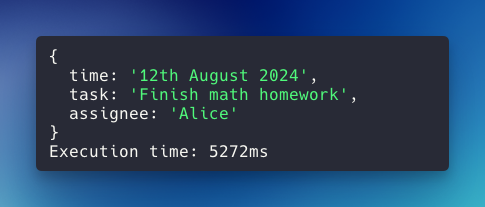
Structured output sample result
Feel free to play around with the user prompt in the user's content block.
## Example usage: parsing data from RAW HTML
Let's test this feature in a real-life scenario: Parsing structured data from raw HTML. Imagine we need a web scraping/parsing program to read data and return nice structured JSON data.
We'll use the exact setup as above, but we need to update the prompt and the expected output format. In this example, we'll parse the book data available on a raw HTML. I took the raw HTML from this page:
**Step 1: Prepare the raw HTML data**
I'm wrapping this long string on a function so we can quickly call it later.
```javascript
function getData()
{
return `RAW_HTML_DATA_HERE`
}
```
Here is the actual content if you want to copy-paste it:
**Step 2: Add the expected output**
Here is my expected output in a Zod schema.
```javascript
const BooksFormat = z.object({
books: z.array(
z.object({
title: z.string(),
link: z.string(),
image: z.string(),
rating: z.number(),
price: z.number(),
in_stock: z.boolean(),
})
)
});
```
**Step 3: Update the instructions**
Let's update the run function.
```javascript
async function run(){
const completion = await openai.beta.chat.completions.parse({
model: "gpt-4o-2024-08-06",
messages: [
{ role: "system", content: "Extract the books information from the raw HTML." },
{ role: "user", content: getData() },
],
response_format: zodResponseFormat(BooksFormat, "books"),
});
console.log(completion.choices[0].message.parsed)
}
run()
function getData()
{
...
}
```
Here is the result:
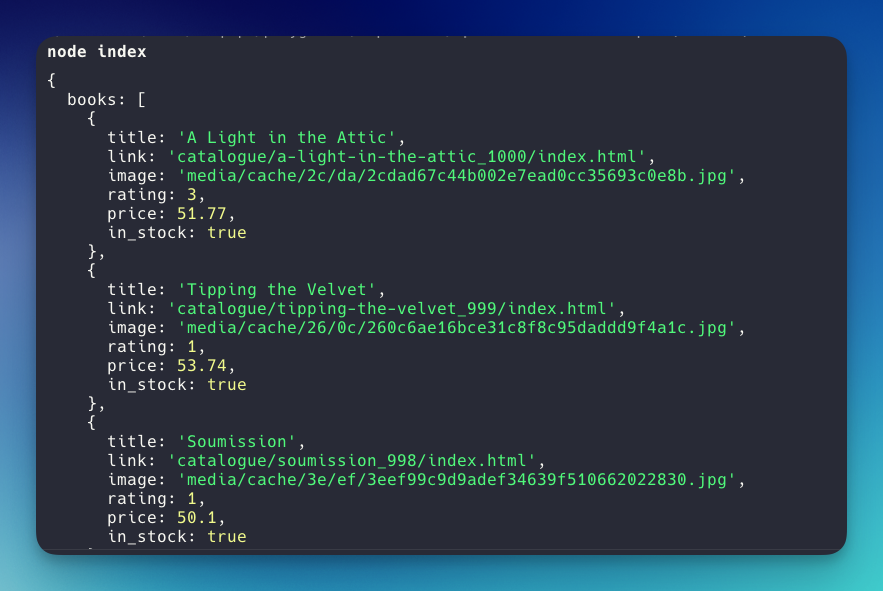
json sample result
As you can see, the book data is nicely wrapped in the book array. It's exactly what we declare on the Zod Schema.
## Handling user-generated input (missing information)
If we're parsing data from user-generated input, there's a probability that certain information is not available.
My current workaround is adjusting the prompt to handle this correctly, for example:
```
{ role: "system", content: "Extract the todo information from the prompt. Add empty value (don't write anything) if something not specified" },
```
Let's say the customer has this as input for our todo app:
```
{ role: "user", content: "Alice need to finish her math homework. Don't forget!" },
```
There's no time specified. Here is the result:

This way, we can handle an empty value through an if-else condition.
*I recommend that you start using OpenAI's Structured Outputs feature whenever you need to extract data accurately from a raw string.*