> ## Content Index
> Fetch the complete content index at: https://serpapi.com/blog/llms.txt
> Use this file to discover other available public pages before exploring further.
# How to Scrape Google Search Results (SERPs) - 2026 Guide
- URL: https://serpapi.com/blog/how-to-scrape-google-search-results-serp/
- Published: 2023-02-17T02:56:49.000Z
- Updated: 2026-04-29T07:38:24.000Z
- Author: Andy L
- Tags: google search, seo tools, Web Scraping
Google, Bing, and Yahoo search results, also known as SERPs (search engine results pages), can be a valuable source of information for businesses, researchers, and individuals. However, manually collecting this data can be time-consuming and tedious. Many web scrapers allow you to scrape Google Search Results, and web scraping tools like SerpApi are among the highest-quality web scraping automation solutions (crawlers).
SERP APIs like [SerpApi](https://serpapi.com/) allow you to scrape Google search web pages without coding or maintaining scraping scripts. Instead, you can make API calls to the Google Search API of the [SerpApi](https://serpapi.com/) server(Google Search scraper) to retrieve the search results you need. This can save you a lot of time and hassle. You don’t need to care about HTTP requests, parsing HTML files to JSON(parser), or captcha, IP address, bots detection, maintaining user-agent, HTML headers, being blocked by Google... You can concentrate on your business.
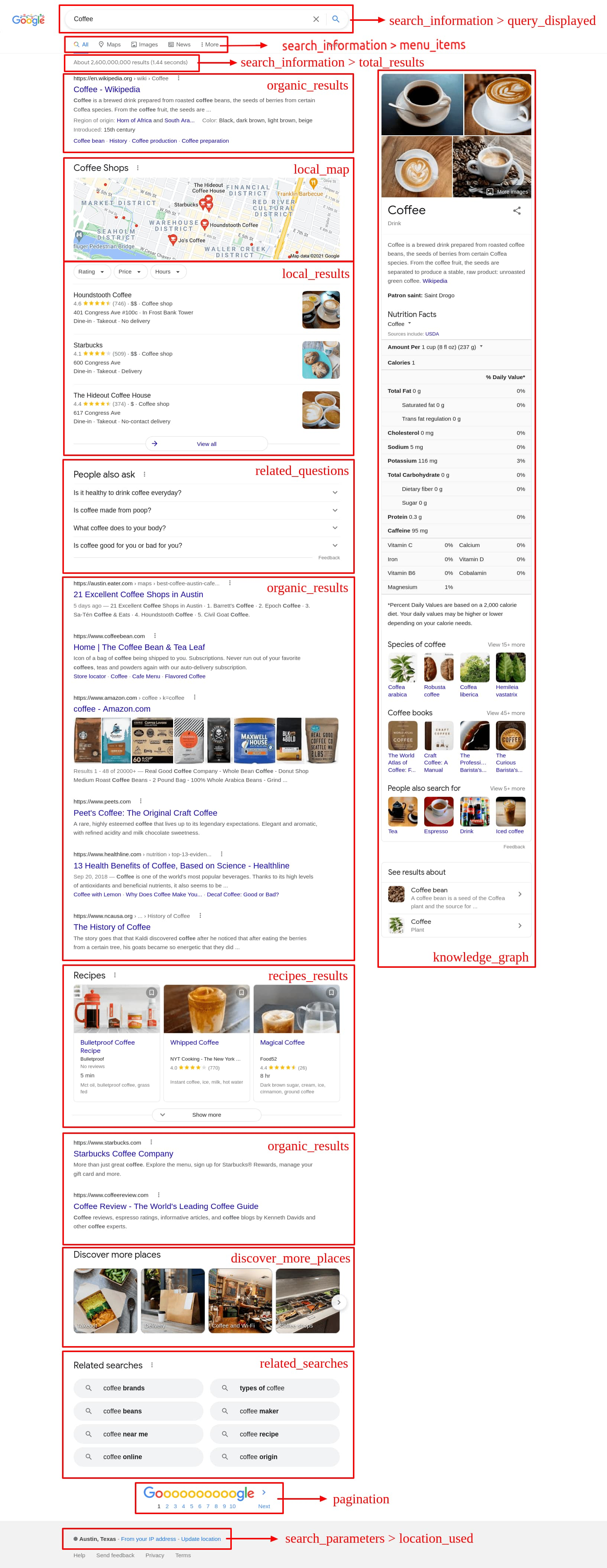
Before you start scraping the Google search page, it's important to understand the structure of the Google scraping search results page. A Google SERP consists of many components, including [organic results](https://serpapi.com/organic-results), [local results](https://serpapi.com/local-pack), [ad results](https://serpapi.com/google-ads), the [knowledge graph](https://serpapi.com/knowledge-graph), [direct answer boxes](https://serpapi.com/direct-answer-box-api), [images results](https://serpapi.com/images-results), [news results](https://serpapi.com/news-results), [shopping results](https://serpapi.com/shopping-results), [video results](https://serpapi.com/videos-results), [google maps results](https://serpapi.com/google-maps-api), and more. Understanding this structure will allow you to extract the relevant information in an organized and efficient manner. Visit the [SerpApi](https://serpapi.com/) [document page](https://serpapi.com/search-api#api-examples) to explore more than 50 Google SERPs components with customization parameters and what the JSON response looks like.
### Setting up a SerpApi account
The best way to get started with scraping Google SERPs is to create a [SerpApi](https://serpapi.com/) account. You can [sign up](https://serpapi.com/users/sign%5Fup) for a free account on the [SerpApi](https://serpapi.com/) website, allowing you to make up to 100 API requests per month. If you need more, [paid plans](https://serpapi.com/pricing) are also available with higher limits. Visit our [pricing page](https://serpapi.com/pricing) to learn more.
Hooray! With your newly created account, you can visit the [SerpApi playground](https://serpapi.com/playground) to try some searches and scrape your first result.
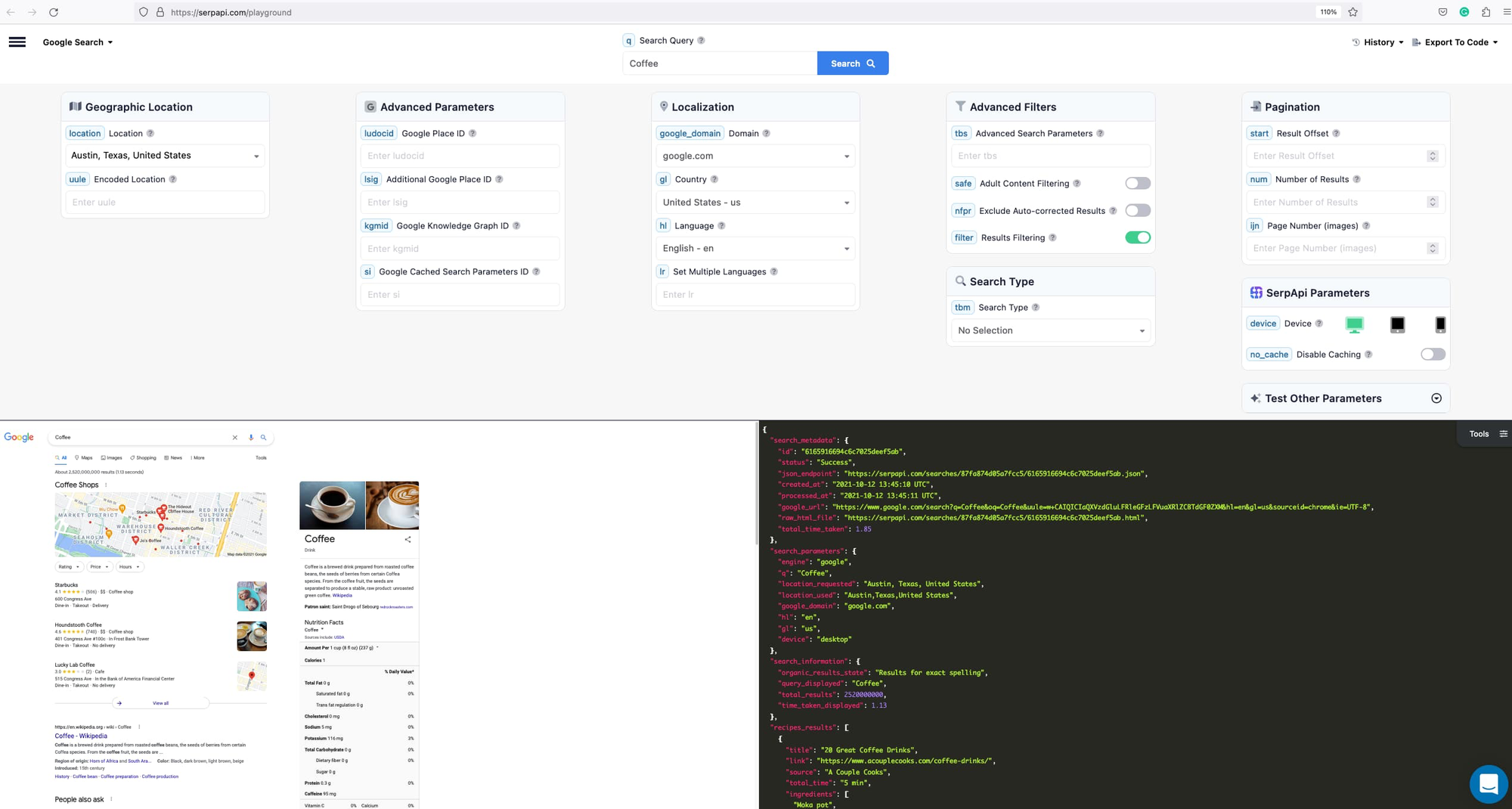
Once you've created an account, the next step is to obtain [the API key](https://serpapi.com/manage-api-key). You can use this key in your code to access the [SerpApi API](https://serpapi.com/search-api) and retrieve the desired information.
### Making your first Google SERP scrape with SerpApi (Ruby)
We will be using Ruby in this tutorial, and the process is similar to other languages like Python, Node, Java, Javascript, etc
To retrieve the Google SERP for a given search query using [Ruby](https://www.ruby-lang.org/en/), you'll first need to install the [SerpApi Ruby client library](https://github.com/serpapi/google-search-results-ruby). You can do this by adding the following line to your Gemfile:
```ruby
gem 'google_search_results'
```
And then run the following command in your terminal:
```ruby
bundle install
```
Next, you'll need to require the library and specify your [API key](https://serpapi.com/manage-api-key):
```ruby
require 'google_search_results'
# scrape https://www.google.com/search?q=coffee page, real-time search
search = GoogleSearch.new(q: "coffee", serp_api_key: "secret_api_key")
```
To retrieve the Google SERP for a given search query, you can use the following code:
```ruby
results = search.get_hash
```
The `results` variable now contains a hash with all the information from the Google SERP. Now that we have the response, we can extract the search results(you can use these organic results to improve your SEO). For example, we can store the "related\_questions" in a CSV file or Google sheet/excel or use it to populate a database.
```ruby
require 'csv'
CSV.open("related_questions.csv", "w") do |csv|
csv << ["question", "snippet", "title", "link"]
results[:related_questions].each do |question|
csv << [question[:question], question[:snippet], question[:title], question[:link]]
end
end
```
Scrape Google related questions results to CSV file
### Useful guides for scraping Google Results
Looking for more guides with your favorite languages or use cases? Check out more blog posts from us:
- Scraping Google Results with Python(without "beautifulsoup" library):
- Scraping Google Results with NodeJS:
- Scraping Google Results to enhance GPT-3:
- Want to master the keyword Google search? check out:
- Tips and Tricks:
- You are finding a way to generate massive sales leads from Google Maps, check out [part 1](https://serpapi.com/blog/mastering-sales-prospecting-a-guide-to-generating-a-targeted-list-of-500-restaurants-bars-and-pubs/) and [part 2](https://serpapi.com/blog/mastering-sales-prospecting-a-guide-to-generating-a-targeted-list-of-500-restaurants-bars-and-pubs-part-2/)
- You are building AI product and want a super fast Google Results API, check out this blog post:
It's important to remember that scraping is a delicate and often controversial topic, both ethically and legally. The [SerpApi](https://serpapi.com/) qualifies as "Legal US Shield" and is trusted by many customers like The New York Times, IBM, Shopify, KPMG, Airbnb, Harvard University, BrightLocal, and more.
Additionally, to avoid being detected and blocked by Google, [SerpApi](https://serpapi.com/) uses a proxy and the latest technologies to mimic human behavior. It's by default when you're using [SerpApi](https://serpapi.com/) to scrape data.
If you have any questions, please feel free to [reach out to me](mailto:andy@serpapi.com).