> ## Content Index
> Fetch the complete content index at: https://serpapi.com/blog/llms.txt
> Use this file to discover other available public pages before exploring further.
# Create a Stock Monitoring Dashboard with Python & SerpApi
- URL: https://serpapi.com/blog/create-a-stock-monitoring-dashboard-with-python-serpapi/
- Published: 2026-11-11T19:30:00.000Z
- Updated: 2026-11-11T19:29:59.000Z
- Author: Autumrose Stubbs
Keeping track of stock performance across dozens or even hundreds of companies can quickly become overwhelming. Instead of manually checking financial websites throughout the day, you can build a dashboard that automatically gathers stock prices, company news, analyst ratings, and market trends in one place.
In this tutorial, we'll build a stock monitoring dashboard using SerpApi's Google Finance API, Google News API, and Google Trends API.
If you are new to SerpApi, get setup before diving in, using this blog post:
[Getting started with SerpApi: The Web Search APILearn what SerpApi is, how to use it, and why you need it.SerpApiHilman Ramadhan](https://serpapi.com/blog/getting-started-with-serpapi-the-web-search-api/)
## Getting Setup
Before we get started with the code, let's make sure everything is installed and set up.
### Install Packages
For this example we will need to install relevant packages if you don't have them already including:
- `requests`: Query SerpApi using a query link.
- `python-dotenv`: Store and access your API key in a .env file
- `pandas`: Organize and manipulate returned data
- `streamlit`: Display the data on a dasbhoard
You can install all 4 at once using this command:
```Bash
pip install requests python-dotenv pandas streamlit
```
Now that all required packages are installed let's move into the code.
### .env File
If you're not sure how to store your API key in a .env file, get started with this blog post:
[How to securely store your API keysYour API keys shouldn’t live inside your codebase. Here’s how to protect them with environment variables.SerpApiCorbin Davenport](https://serpapi.com/blog/how-to-securely-store-api-keys/)
## Code Step By Step
Now let's jump into the code, you should have a Python project file setup.
### Import Packages
First we'll import the applicable packages in our code in order to access them. `os`, `zoneinfo`, and `datetime` are included in Python's standard library and do not need to be installed separately.
```Python
import requests
import os
import streamlit as st
import pandas as pd
from dotenv import load_dotenv
from datetime import datetime
from zoneinfo import ZoneInfo
```
### Get Finance Results for a Watchlist
We will be using the [Google Finance API](https://serpapi.com/google-finance-api) to track specific tickers, including their title, prices, and movement.
1. **Set watchlist dictionary of arrays**
This should contain the company tickers you want to track with the value set as an array to store the values we collect.
```Python
watchlist = {"AAPL":[], "MSFT":[], "GOOGL":[], "NVDA":[], "AMZN":[]}
```
1. **Define a function:**
Input parameter: `watchlist` dictionary to read and add the values from the results
```Python
def get_watchlist_finance(watchlist):
```
1. **Set unchanging parameters**
In this example, for every Google Finance API query, these parameters will be the same for every query:
- `engine`: Search engine you want to query. For the Google Finance API, find it [here](https://serpapi.com/google-finance-api#api-parameters-serpapi-parameters-engine).
- `api_key`: Your secret API key. Find it [here](https://serpapi.com/manage-api-key).
- `json_restrictor`: Not required but in this example we'll only be accessing the data in the `summary` section of the results. See more [here](https://serpapi.com/json-restrictor).
```Python
params = {
"engine": "google_finance",
"api_key": API_KEY,
"json_restrictor":"summary"
}
```
1. **Query SerpApi for Watchlist**
Iterate through each key from the watchlist and set the `q` parameter to the key. Then query the SerpApi endpoint using `requests` and the input parameters.
```Python
for key in watchlist:
params["q"] = f"{key}:NASDAQ"
results = requests.get("https://serpapi.com/search.json", params=params).json()["summary"]
```
1. **Extract & Assign Result Values**
Extract the `title` and `price` from the results. As well as the `price_movement` including the `direction`. If the `direction` is down set the value to negative.
Append all the values to the ticker key array list for our use later.
```Python
watchlist[key].append(results["title"])
watchlist[key].append(results["price"])
price_movement = results["price_movement"]["value"]
price_dir = results["price_movement"]["movement"]
if "Down" in price_dir:
price_movement *= -1
watchlist[key].append(price_movement)
```
1. **Query Google Trends**
Lastly we will send our list to the `get_trends` function to add on trend ranking data for each watchlist ticker.
```Python
get_trends(watchlist)
```
### Get Emerging Companies
We will be using the [Google News API](https://serpapi.com/google-news-api) find companies that have been emerging in the news and may be up and coming. As well as the [Google AI Mode API](https://serpapi.com/google-ai-mode-api), in order to identify the company name from the news.
1. **Set empty `companies` dictionary**
As we are looking for companies, this should be an empty dictionary until we extract additional data.
```Python
companies = {}
```
1. **Define a function:**
Input parameter: `companies` empty dictionary to add the companies and their data to.
```Python
def get_emerging_companies(companies):
```
1. **Query SerpApi for News Results**
In this example, we will only be querying the Google News API once for results, using these parameters:
- `engine`: Search engine you want to query. For the Google News API, find it [here](https://serpapi.com/google-news-api#api-parameters-serpapi-parameters-engine).
- `api_key`: Your secret API key. Find it [here](https://serpapi.com/manage-api-key).
- `q`: Term used to populate emerging companies in news results. In this case "emerging companies".
Query the SerpApi endpoint using `requests` and the input parameters.
```Python
params = {
"engine": "google_news",
"api_key": API_KEY,
"q": "emerging companies",
}
results = requests.get("https://serpapi.com/search.json", params=params).json()
```
1. **Extract Relevant Data**
Extract the article `title` and `link`.
```Python
for result in news_results["news_results"]:
title = result["title"]
link = result["link"]
```
1. **Query SerpApi Google AI Mode**
We also would like the company name which can be difficult to extract from the Article title. Query the Google AI Mode API and collect the company name from the article title.
```Python
params = {
"engine": "google_ai_mode",
"api_key": API_KEY,
"q": f"Provide the company from this title on the first line and only that, if a company title is not available then just print \"None\": {title}"
}
results = requests.get("https://serpapi.com/search.json", params=params).json()
```
1. **Assign Result Values**
If Google AI Mode provided results, assign the name to the value on the first line of the `text_block` / `snippet`.
Set the dictionary key of `name` to an empty list. Then append the HTML for the link and title of the article.
```Python
if "text_blocks" in results:
name = results["text_blocks"][0]["snippet"].split('\n')[0].replace(',', '')
if "None" not in name:
companies[name]=[]
companies[name].append(f'{title}')
```
1. **Exit Loop**
We are only looking for the first 5 companies so once the list is at 5, break out of the iteration of news results.
```Python
if len(companies)>=5:
break
```
1. **Query Google Trends**
Lastly we will send our list to the `get_trends` function to add on trend ranking data for each emerging company.
```Python
get_trends(companies)
```
### Get Trending Data
We will be using the [Google Trends API](https://serpapi.com/google-trends-api) to track trend ranking for our watchlist as well as our emerging companies.
1. **Define a function:**
Input parameter: `input_list` dictionary of either the `watchlist` or `companies`.
```Python
def get_trends(input_list):
```
1. **Query SerpApi for Trends Results**
In this example, we will only be querying the Google Trends API once for results, using these parameters:
- `engine`: Search engine you want to query. For the Google Trends API, find it [here](https://serpapi.com/google-trends-api#api-parameters-serpapi-parameters-engine).
- `api_key`: Your secret API key. Find it [here](https://serpapi.com/manage-api-key).
- `q`: Specify up to 5 terms to compare, separated by a comma.
- **NOTE**: In this case I joined the input list by commas, however if your dicts have over 5 terms you will need to separate these out into separate queries.
- `date`: Set the time range you want to see results for. See more [here](https://serpapi.com/google-news-api#api-parameters-serpapi-parameters-engine).
Query the SerpApi endpoint using `requests` and the input parameters.
```Python
params = {
"engine": "google_trends",
"api_key": API_KEY,
"q": ",".join(input_list.keys()),
"date": "now 1-d"
}
results = requests.get("https://serpapi.com/search.json", params=params).json()
```
1. **Extract & Append Relevant Data**
Extract each term's average interest over time and append it to the list associated with the corresponding key in `input_list` (`watchlist` or `companies`)
```Python
for result in results["interest_over_time"]["averages"]:
query = result["query"]
input_list[query].append(result["value"])
```
### Setup Streamlit Dashboard
Now let's setup Streamlit to display the data we collected.
1. **Define a function:**
Input: `watchlist` and `companies` to extract the completed data.
```Python
def setup_streamlit(watchlist, companies):
```
1. **Collect the Date / Time**
Using `datetime`, identify the current date, hour, minute for ET.
```Python
et_now = datetime.now(ZoneInfo("America/New_York"))
date = f"{et_now.date()} {et_now.hour}:{et_now.minute}ET"
```
1. **Set the Title**
Set the site title plus the date on a newline.
```Python
st.title(f'Stocks Dashboard \n{date}')
```
1. **Set Watchlist**
Write the title for "Watchlist" and query the `display_table` function including the column labels.
```Python
st.write("Watchlist")
display_table(watchlist, ["Name", "Price", "Price Movement", "Trend Score"], 3, "Ticker")
```
1. **Set Companies**
Write the title for "Emerging Companies" and query the `display_table` function including the column labels.
```Python
st.write("Emerging Companies")
display_table(companies, ["Article", "Trend Score"], 1, "Name", render_html=True)
```
### Setup a Streamlit Table for Each Dataset
1. **Define a function:**
Inputs: `input_list` (watchlist or companies), `labels` (column labels), `trend_index` (index of trend value for sorting), `index_name` (key / index), `render_html` (for the hyperlink for companies).
```Python
def display_table(input_list, labels, trend_index, index_name, render_html=False):
```
1. **Sort Items**
Sort items by highest -> lowest using the Trends ranking and input index of the trends list.
```Python
sorted_items = sorted(
input_list.items(),
key=lambda item: item[1][trend_index] if len(item[1]) > trend_index else -1,
reverse=True
)
```
1. **Setup Data for a Table**
Iterate through pairs in the sorted list. Assign row data to `rows` and setup labels then set up a DataFrame.
```Python
rows = []
for key, values in sorted_items:
row = {index_name: key}
for label, value in zip(labels, values):
row[label] = value
rows.append(row)
df = pd.DataFrame(rows)
```
1. **Send Data to Streamlit**
If input parameter `render_html` is true (companies) use markdown in order for the hyperlink to work.
Otherwise set `index_name` and send the DataFrame.
```Python
if render_html:
st.markdown(df.to_html(escape=False, index=False, justify="left"), unsafe_allow_html=True)
else:
df = df.set_index(index_name)
st.dataframe(df, width="stretch")
```
### Set up Main
Ensure you have main setup to initialize the dictionaries and query the functions we have set up.
```Python
def main():
watchlist = {"AAPL":[], "MSFT":[], "GOOGL":[], "NVDA":[], "AMZN":[]}
get_watchlist_finance(watchlist)
companies = {}
get_emerging_companies(companies)
setup_streamlit(watchlist, companies)
if __name__ == "__main__":
main()
```
### Run the Program
To run the program including Streamlit, you must use this command:
```Bash
program_name streamlit run stocks.py
```
Make sure to replace "program\_name" with your programs actual name, i.e main.py.
## Full Code
See the full Python code below.
```Python
import requests
import os
import streamlit as st
import pandas as pd
from dotenv import load_dotenv
from datetime import datetime
from zoneinfo import ZoneInfo
load_dotenv()
API_KEY = os.getenv("API_KEY")
# Use SerpApi's Google Finance API to check the each ticker in our watchlist
def get_watchlist_finance(watchlist):
# Set parameters for the query, including the engine, API key, and JSON restrictor which will stay constant for all tickers
params = {
"engine": "google_finance",
"api_key": API_KEY,
"json_restrictor":"summary"
}
# Iterate through each ticker in the watchlist
for key in watchlist:
# Set the query parameter for the current ticker and query SerpApi
params["q"] = f"{key}:NASDAQ"
results = requests.get("https://serpapi.com/search.json", params=params).json()["summary"]
# Append the title and price to the watchlist for the current ticker
watchlist[key].append(results["title"])
watchlist[key].append(results["price"])
# Append the price movement to the watchlist for the current ticker, setting negative if the direction is down
price_movement = results["price_movement"]["value"]
price_dir = results["price_movement"]["movement"]
if "Down" in price_dir:
price_movement *= -1
watchlist[key].append(price_movement)
# Query the get_trends method to collect trends data for the tickers
get_trends(watchlist)
# Use SerpApi's Google News API to find stories regarding emerging companies then extract the title using the Google AI Mode API
def get_emerging_companies(companies):
# Set parameters and query the Google News API
params = {
"engine": "google_news",
"api_key": API_KEY,
"q": "emerging companies",
}
news_results = requests.get("https://serpapi.com/search.json", params=params).json()
# Iterate through each news result to collect the title and link
for result in news_results["news_results"]:
title = result["title"]
link = result["link"]
# Query the Google AI Mode API to extract the company name from the news title
params = {
"engine": "google_ai_mode",
"api_key": API_KEY,
"q": f"Provide the company from this title on the first line and only that, if a company title is not available then just print \"None\": {title}"
}
results = requests.get("https://serpapi.com/search.json", params=params).json()
# check if the results contain text blocks and extract the company name
if "text_blocks" in results:
name = results["text_blocks"][0]["snippet"].split('\n')[0].replace(',', '')
if "None" not in name:
# Set the key to the company name with an array to hold its data, append HTML title and link
companies[name]=[]
companies[name].append(f'{title}')
# If the companies list has reached 5, stop collecting more companies
if len(companies)>=5:
break
# Query the get_trends method to collect trends data for the companies
get_trends(companies)
# Query Google Trends for the given list of tickers or companies and append the trend data to the input list
def get_trends(input_list):
# Set parameters and query the Google Trends API
params = {
"engine": "google_trends",
"api_key": API_KEY,
"q": ",".join(input_list.keys()),
"date": "now 1-d"
}
results = requests.get("https://serpapi.com/search.json", params=params).json()
# Iterate through each trend result and append the trend value to the corresponding company or ticker in the input list
for result in results["interest_over_time"]["averages"]:
query = result["query"]
input_list[query].append(result["value"])
# Display the table on Streamlit including formatting, HTML rendering, and sorting by trend score
def display_table(input_list, labels, trend_index, index_name, render_html=False):
sorted_items = sorted(
input_list.items(),
key=lambda item: item[1][trend_index] if len(item[1]) > trend_index else -1,
reverse=True
)
rows = []
for key, values in sorted_items:
row = {index_name: key}
for label, value in zip(labels, values):
row[label] = value
rows.append(row)
df = pd.DataFrame(rows)
if render_html:
st.markdown(df.to_html(escape=False, index=False, justify="left"), unsafe_allow_html=True)
else:
df = df.set_index(index_name)
st.dataframe(df, width="stretch")
# Set up the Streamlit dashboard with the titles, date, and query streamlit helper
def setup_streamlit(watchlist, companies):
et_now = datetime.now(ZoneInfo("America/New_York"))
date = f"{et_now.date()} {et_now.hour}:{et_now.minute}ET"
st.title(f'Stocks Dashboard \n{date}')
st.write("Watchlist")
display_table(watchlist, ["Name", "Price", "Price Movement", "Trend Score"], 3, "Ticker")
st.write("Emerging Companies")
display_table(companies, ["Article", "Trend Score"], 1, "Name", render_html=True)
def main():
watchlist = {"AAPL":[], "MSFT":[], "GOOGL":[], "NVDA":[], "AMZN":[]}
get_watchlist_finance(watchlist)
companies = {}
get_emerging_companies(companies)
setup_streamlit(watchlist, companies)
if __name__ == "__main__":
main()
```
## Results / Dashboard
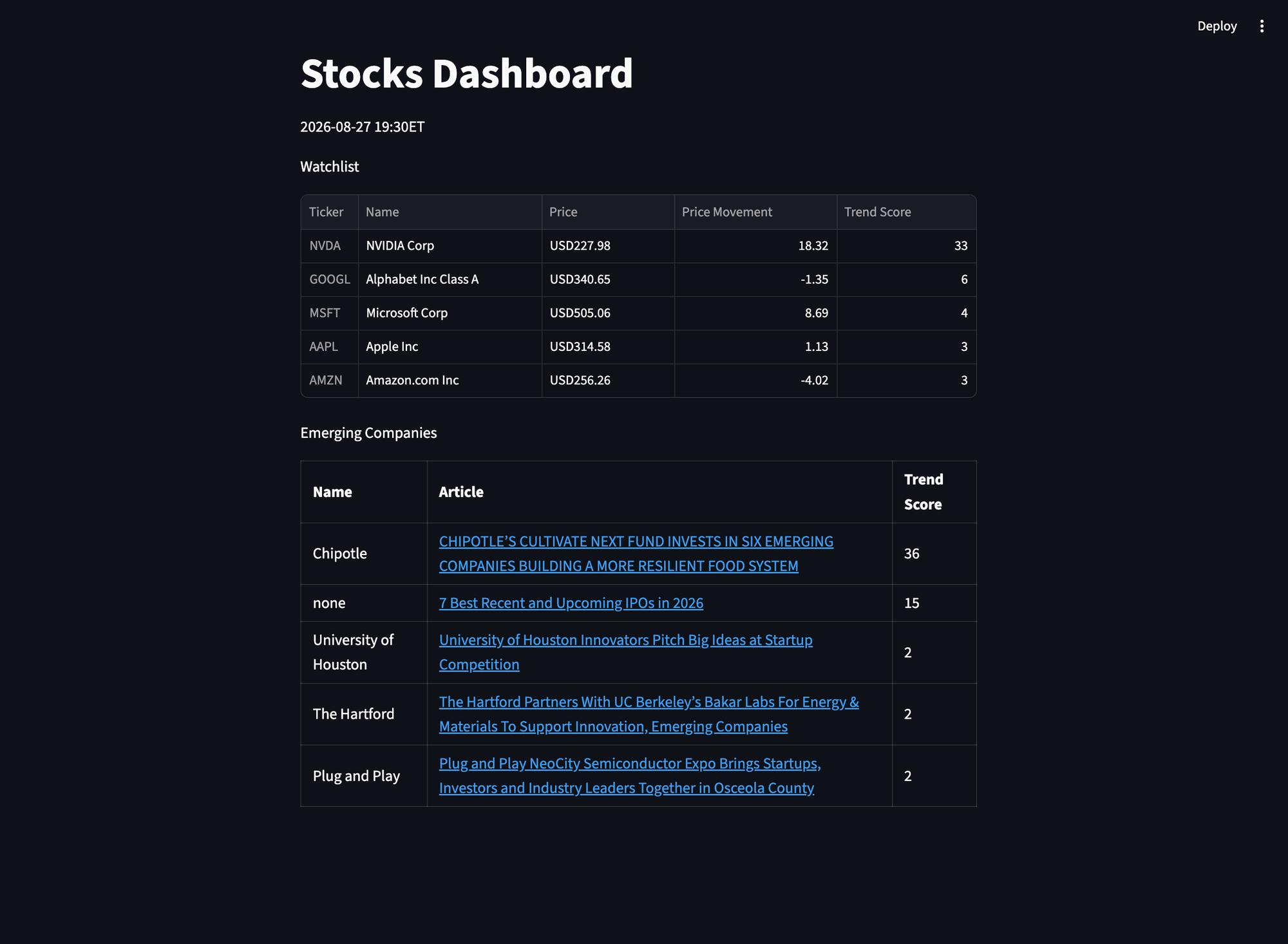
Here's the finished dashboard, where you can monitor stock prices, price movements, and trending data for the stocks you're keeping an eye on. You can also explore company news and emerging trends to help spot developments and shifts in interest.
While this dashboard is a simple example of what's possible with SerpApi, there's much more data you can put to work. Google Finance provides additional valuable insights we haven't even used here, including market details, historical price movements, and additional stock recommendations.
You can also take things further by regularly checking so the dashboard is real time and setting up automated alerts through tools like Slack or email. Imagine getting notified when a stock experiences a significant price movement, a company starts trending, or important news breaks. You can turn a simple dashboard into a much more powerful, automated monitoring tool tailored to your needs.
## Conclusion
You've now built a stock dashboard powered by real-time insights from SerpApi's Google Finance API, Google Trends API, Google News API, and Google AI Mode API.
And this is just one example of what's possible! There's so much more data to explore across these APIs and the many other APIs SerpApi supports. Whether you're building dashboards, tracking market trends, or creating entirely new applications, the possibilities are endless.
Haven't signed up yet? Get started for free with **250 successful searches per month**:
Explore the rest of our APIs here:
Need a hand along the way? Reach out to us via chat or email at [contact@serpapi.com](mailto:contact@serpapi.com). We're always happy to help!
## Related Blogs
- [Web scraping stock prices in Python](https://serpapi.com/blog/web-scraping-stock-prices-in-python/)
- [Web Scraping Google Finance Main Page in Python](https://serpapi.com/blog/web-scraping-google-finance/)
- [Scrape Google Finance Markets in Python](https://serpapi.com/blog/scrape-google-finance-markets-in-python/)
- [Scrape Google Finance Ticker Quote Data in Python](https://serpapi.com/blog/scrape-google-finance-ticker-quote-data-in-python/)
- [How to scrape Google Trends](https://serpapi.com/blog/how-to-scrape-google-trends/)
- [Trend Prediction for Emerging Products using Python](https://serpapi.com/blog/trend-prediction-for-emerging-products-using-python/)
- [Scraping Google news using Python (2026 Tutorial)](https://serpapi.com/blog/scraping-google-news-using-python-tutorial/)
- [How to Build a Brand Monitoring Dashboard with SerpApi and Python](https://serpapi.com/blog/how-to-build-a-brand-monitoring-dashboard-with-serpapi-and-python/)